Author: ahmed7

Common Linux Commands Part 1:

ls – list current directory contents

pwd – prints the present working directory

cd – change directory

file – print the file type

less – prints the contents within a file

cp – copy files or folder

mkdir – make a directory

mv – rename or move files

rm – remove file or directory

cat – displays the contents of the file

wc – displays the number of lines, words and bytes in a file.

head – displays the first few lines of the file

tail – displays the last few lines of the file

clear – clears the screen

history – displays the content of the previously executed commands on the shell from history list

chgrp – change the ownership of the file’s group

passwd – change user’s password

chmod – change the permission mode of the file

chown – change file owner / group

ps – displays details of all the current processes

jobs – displays a list of all the active jobs

ping – send echo request to the network hosts

traceroute – displays the route packets trace to network host

netstat – displays the network connections, routing tables, interface stats etc

wget – network downloader

ssh – the openSSH ssh client to connect to remote host

locate – find files by name

find – search for files in directories

gzip – compress or expand files

tar – archiving utility

zip – package and compress file

grep – searches for the text in a file according to the regular expression given

sort – sort lines of text files

uniq – omits the repeated lines

cut – removes the section from each line of the file

diff – examine the changes or differences in the files

How to get details of SQL Server agent Jobs from Queries

All the SQL Server Agent Jobs details are logged into the MSDB Database tables .

These tables contains information for each SQL server Agent job like : JobID, sessionID, RunDate , Enabled Status, Owner, Job Steps, Last Run outcomes etc . Tables which are commonly used are :

select * from [dbo].[sysjobactivity]
select * from [dbo].[sysjobhistory]
select * from [dbo].[sysjobs]
select * from [dbo].[sysjobschedules]
select * from [dbo].[sysjobservers]
select * from [dbo].[sysjobsteps]
select * from [dbo].[sysjobstepslogs]

Msg 8120, Level 16, State 1, Line 1 Column ” is invalid in the select list because it is not contained in either an aggregate function or the GROUP BY clause.

We will be using the table ‘[HR].[Employees]’ from TSQL2012 database.

The error as described in the Title of the post :

"Msg 8120, Level 16, State 1, Line 1 Column 'HR.Employees.lastname' is invalid in the select list because it is not contained in either an aggregate function or the GROUP BY clause."

The error occured when I executed the following query :

select min(empid) as minimum,lastname from [HR].[Employees] 

The reason for the error is : We are missing the group by clause at the end .When we are using an aggregate function along with other columns in the select clause we must use the group by clause .

select min(empid) as minimum,lastname from [HR].[Employees] group by lastname

If you are using more than one column in the select clause while using the aggregate function , then it is necessary to include all the columns in the group by clause except the column on which the aggregate function is applied. For instance : if you use execute the below query , it will throw the same error:

select min(empid) as minimum,lastname,firstname from [HR].[Employees] group by lastname

So , we must include the firstname column as well to successfully execute it as below :

select min(empid) as minimum,lastname,firstname from [HR].[Employees] group by lastname,firstname

Msg 8152, Level 16, State 4, Line 1 String or binary data would be truncated.

This Error is very common when we insert or update data.

This error occurs when we try to insert data which is greater than the length of the column in which we are inserting the data.

For Instance : Lets see an example in our TSQL2012 database :

insert into [Production].Categories(categoryname,description) values ('No chocolate items','no chocolate')

It gave me an error :

Msg 8152, Level 16, State 4, Line 1
String or binary data would be truncated.
The statement has been terminated.

This happened because the Column Categoryname has the column type : nvarchar(15) , which means nvarchar can take upto 15 characters maximum. And the total length of characters tried to insert: ‘No chocolate items’ is of length 18 .

To solve this problem ,we can increase the length of column size to 18 . Or , we can reduce the characters accordingly to fit the size of 15 .

MS SQL Script for creating the database TSQL2012 ,which we will use.

We will be working on the script attached during our posts . You can copy and paste the script in Microsoft SQL 2012 as we will be working on the tables , views , stored procedures , functions and other objects in the script.

Copy , paste and execute the whole script in a new MS SQL 2012 management Studio on the New Query tab to create the TSQL2012 database.

Attached is the script below in the TSQL2012.sql file .

ETL(Extract , Transform and Load) – Part 1 -Introduction to Data warehouse

The analyses of data from relational databases (LOB) applications is not an easy . The normalized relational schema used for an LOB application can consist of hundreds of tables. It is difficult to discover where the data you need for a report is located.
In addition, LOB applications do not track data over time(they perform many DML operations), though many analyses depend on historical data.

A Data warehouse is a centralized data database for an enterprise that contains merged, cleansed, and historical data. The DW data is more better for reporting purposes . The logical design of schema of DW is called Star schema and snowflake schema which consists of Dimension and fact Tables.

The data in DW comes from LOB / relational database . The data which comes in DW is more cleansed ,transformed . OF course , while coming into DW , the data must have gone through some changes so we can get the refreshed data in DW . One way to refresh or let the new data come into DW is through the night job schedule . The report for newly or refreshed data can then be read . 

The physical design for the  DW is simpler than the relational database design as it contains less tables joins .

————————————————————————————————————————————-

CHAPTER 1 : Introduction to Star and Snowflake Schemas

First learning why Reporting is a Problem with a Normalized Schema : 

Lets take AdventureWorks2012 sample database . Now The report should include the sales amount for Internet sales in different countries over multiple years. This will end up with almost 10 tables. The AdventureWorks2012 database schema is very normalized; it’s intended as an example schema to support LOB applications.

The goal of normalization is to have a complete and non-redundant schema.
Every piece of information must be stored exactly once. This way, you can enforce data integrity.

So, a query that joins 10 to 12 tables, as would be required in reporting sales by countries
and years, would not be very fast and can cause performance issues as it reads huge amounts of data sales over multiple years and thus would interfere with the regular transactional work of insertion and updation of the data.

Another problem is in many cases, LOB databases are purged otypically after each new fiscal year starts. Even if you have all of the historical data for the sales transactions, you might have a problem showing the historical data correctly. For example, you might have only the latest customer address, which might prevent you from calculating historical sales by country correctly .

The AdventureWorks2012 sample database stores all data in a single database. However, in an enterprise, you might have multiple LOB applications, each of which might store data in its own database. You might also have part of the sales data in one database and part in another.
And you could have customer data in both databases, without a common identification. In such cases, you face the problems of how to merge all this data and how to identify which customer from one database is actually the same as a customer from another database.

Finally, data quality can be low. The old rule, “garbage in garbage out,” applies to analyses as well. Parts of the data could be missing; other parts could be wrong. Even with good data, you could still have different representations of the same data in different databases. For example, gender in one database could be represented with the letters F and M, and in another database with the numbers 1 and 2. So we can put a proper standard in our data warehouse to this problem.

Star Schema

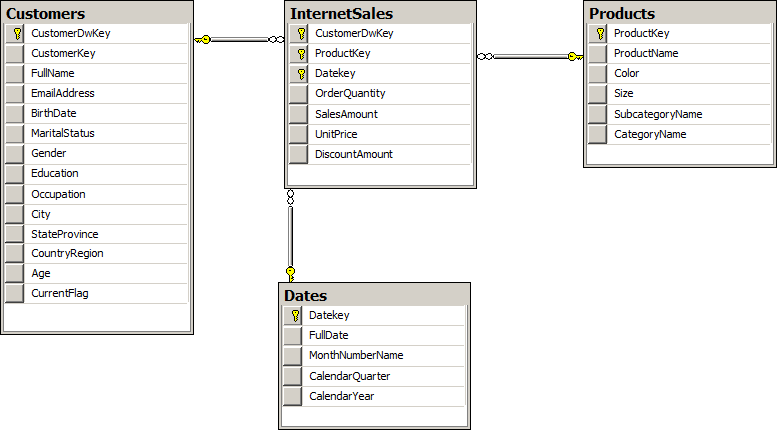
In Figure below, you can easily identify how the Star schema as it resembles
a star. There is a single central table, called a fact table, surrounded by multiple tables called dimensions. One Star schema covers a particular business area. In this case, the schema covers Internet sales. An enterprise data warehouse covers multiple business areas and consists of multiple Star and Snowflake schemas.

star

The fact table is connected to all the dimensions with foreign keys. Usually, all foreign keys taken together uniquely identify each row in the fact table, and thus they all together form a unique key, so you can use all the foreign keys as a composite primary key of the fact table. The fact table is on the “many” side of its relationships with the dimensions. If you were to form a proposition from a row in a fact table, you might express it with a sentence such as,  “Customer CC purchased product BB on date DD in quantity QQ for amount SS.” . 

As we  know, a data warehouse consists of multiple Star schemas. From a business perspective, these Star schemas are connected. For example, you have the same customers in sales as in accounting. You deal with many of the same products in sales, inventory, and production. Of course, your business is performed at the same time over all the different business areas. To represent the business correctly, you must be able to connect the multiple Star schemas in your data warehouse. The connection is simple – you use the same dimensions for each Star schema. In fact, the dimensions should be shared among multiple Star schemas. Dimensions have foreign key relationships with multiple fact tables. Dimensions which have connections to multiple fact tables are called shared or conformed dimensions.

shared dim

Snowflake Schema

You can imagine multiple dimensions designed in a similar normalized way, with a central fact table connected by foreign keys to dimension tables, which are connected with foreign keys to lookup tables, which are connected with foreign keys to their second-level lookup tables.

In this configuration, a star starts to resemble a snowflake. Therefore, a Star schema with normalized dimensions is called a Snowflake schema.

shared dim

In most long-term projects, you should design Star schemas. Because the Star schema is
simpler than a Snowflake schema, it is also easier to maintain. Queries on a Star schema are simpler and faster than queries on a Snowflake schema, because they involve fewer joins.

Hybrid Schema

In some cases, you can also employ a hybrid approach, using a Snowflake schema only for the first level of a dimension lookup table. In this type of approach, there are no additional levels of lookup tables; the first-level lookup table is denormalized. Figure 1-6 shows such a partially denormalized schema.

Quick Question : 

How do we connect multiple star schemas ?

Answer : 

Through shared dimensions .

Granularity Level

The number of dimensions connected with a fact table defines the granularity level.

Auditing and Lineage

A data warehouse may also contain auditing tables. For every update, you should audit who and when the update was done and by whom and how many rows were affected to each dimension and fact table in your DW. If you also audit how much time was needed for each load, you can calculate the performance and take action if it slows down. You store this information in an auditing table .

You might also need to know where each row in a dimension and/or fact table came from and when it was added. In such cases, you must add appropriate columns to the dimension and fact tables. Such fine detailed auditing information is also called lineage.

ETL(Extract , Transform and Load) – Part 2 – Designing Dimensions

Dimensions give context to measures. Typical analysis includes pivot tables and pivot graphs. These pivot on one or more dimension columns used for analysis—these columns are called attributes in DW and OLAP terminology.

Columns with unique values identify rows. These columns are keys. In a data warehouse,
you need keys just like you need them in an LOB database. Keys uniquely identify entities. Therefore, keys are the second type of columns in a dimension.

Pivoting makes no sense if an attribute’s values are continuous, or if an attribute has too
many distinct values. Imagine how a pivot table would look if it had 1,000 columns, or how a pivot graph would look with 1,000 bars. For pivoting, discrete attributes with a small number of distinct values is most appropriate. A bar chart with more than 10 bars becomes difficult to comprehend. Continuous columns or columns with unique values, such as keys, are not appropriate for analyses.

If you have a continuous column and you would like to use it in analyses as a pivoting attribute, you should discretize it. Discretizing means grouping or binning values to a few discrete groups. If you are using OLAP cubes, SSAS can help you. SSAS can discretize continuous attributes. However, automatic discretization is usually worse than discretization from a business perspective. Age and income are typical attributes that should be discretized from a business perspective. One year makes a big difference when you are 15 years old, and much less when you are 55 years old. When you discretize age, you should use narrower ranges for younger people and wider ranges for older people (these are used for Graph type pivoting).

A customer typically has an address, a phone number, and an email address. You do not analyze data on these columns. You do not need them for pivoting. However, you often need information such as the customer’s address on a report. If that data is not present in a DW, you will need to get it from an LOB database, probably with a distributed query. It is much simpler to store this data in your data warehouse. In addition, queries that use this data perform better, because the queries do not have to include data from LOB databases. Columns used in reports as labels only, not for pivoting, are called member properties.

In addition to the types of dimension columns already defined for identifying, naming,
pivoting, and labeling on a report, you can have columns for lineage information,

A dimension may contain the following types of columns:

■■ Keys Used to identify entities
■■ Name columns Used for human names of entities
■■ Attributes Used for pivoting in analyses
■■ Member properties Used for labels in a report
■■ Lineage columns Used for auditing, and never exposed to end users

Hierarchies

Figure 1-9 shows the DimCustomer dimension of the AdventureWorksDW2012 sample database.

dimcustomer

In the figure, the following columns are attributes (columns used for pivoting):
■■ BirthDate (after calculating age and discretizing the age)
■■ MaritalStatus
■■ Gender
■■ YearlyIncome (after discretizing)
■■ TotalChildren
■■ NumberChildrenAtHome
■■ EnglishEducation (other education columns are for translations)
■■ EnglishOccupation (other occupation columns are for translations)
■■ HouseOwnerFlag
■■ NumberCarsOwned
■■ CommuteDistance

All these attributes are unrelated. Pivoting on MaritalStatus, for example, is unrelated to
pivoting on YearlyIncome. None of these columns have any functional dependency between them, and there is no natural drill-down path through these attributes. Now look at the Dim- Date columns, as shown in Figure 1-10.

dimdate

Some attributes of the DimDate edimension include the following (not in the order shown in the figure):
■■ FullDateAlternateKey (denotes a date in date format)
■■ EnglishMonthName
■■ CalendarQuarter
■■ CalendarSemester
■■ CalendarYear

You will immediately notice that these attributes are connected. There is a functional dependency among them, so they break third normal form. They form a hierarchy. Hierarchies are particularly useful for pivoting and OLAP analyses—they provide a natural drill-down path. You perform divide-and-conquer analyses through hierarchies.

Hierarchies have levels. When drilling down, you move from a parent level to a child level. For example, a calendar drill-down path in the DimDate dimension goes through the following levels: CalendarYear ➝ CalendarSemester ➝ CalendarQuarter ➝ EnglishMonthName ➝ FullDateAlternateKey

At each level, you have members. For example, the members of the month level are, of course, January, February, March, April, May, June, July, August, September, October, November, and December. In DW and OLAP jargon, rows on the leaf level—the actual dimension rows—are called members. This is why dimension columns used in reports for labels are called member properties.

In a Snowflake schema, lookup tables show you levels of hierarchies. In a Star schema, you need to extract natural hierarchies from the names and content of columns. Nevertheless, because drilling down through natural hierarchies is so useful and welcomed by end users, you should use them as much as possible.

Slowly Changing Dimensions

There is one common problem with dimensions in a data warehouse: the data in the dimension changes over time. This is usually not a problem in an OLTP application; when a piece of data changes, you just update it. However, in a DW, you have to maintain history. The question that arises is how to maintain it. Do you want to update only the changed data, as in an OLTP application, and pretend that the value was always the last value, or do you want to maintain both the first and intermediate values? This problem is known in DW jargon as the Slowly Changing Dimension (SCD) problem.

The problem is best explained in an example. Table 1-1 shows original source OLTP data
for a customer.

OLTP1

The customer lives in Vienna, Austria, and is a professional. Now imagine that the customer moves to Ljubljana, Slovenia. In an OLTP database, you would just update the City column, resulting in the values shown in Table 1-2.

OLTP2

If you create a report, all the historical sales for this customer are now attributed to the
city of Ljubljana, and (on a higher level) to Slovenia. The fact that this customer contributed to sales in Vienna and in Austria in the past would have disappeared.

In a DW, you can have the same data as in an OLTP database. You could use the same key,
such as the business key, for your Customer dimension. You could update the City column when you get a change notification from the OLTP system, and thus overwrite the history.

 Type 1 SCD :  Type 1 means overwriting the history for an attribute and for all higher levels of hierarchies to which that attribute belongs.

The problem here would rise that you want to store the historical data . What if we want transactions of the same customer when he did in Vienna ? The solution to this problem would be to add a surrogate key (DW key ).

 Type 2 SCD : When you implement Type 2 SCD, for the sake of simpler querying, you typically also add a flag to denote which row is current for a dimension member. Alternatively, you could add two columns showing the interval of validity of a value.

SCD2

You could have a mixture of Type 1 and Type 2 changes in a single dimension. For example, in Table 1-3, you might want to maintain the history for the City column but overwrite the history for the Occupation column. That raises yet another issue. When you want to update the Occupation column, you may find that there are two (and maybe more) rows for the same customer. The question is, do you want to update the last row only, or all the rows? Table 1-4 shows a version that updates the last (current) row only, whereas Table 1-5 shows all of the rows being updated.

scd3

Fact Table Column Types

Fact tables are collections of measurements associated with a specific business process. You store measurements in columns. Logically, this type of column is called a measure. Measures are the essence of a fact table. They are usually numeric and can be aggregated. They store values that are of interest to the business, such as sales amount, order quantity, and discount amount.

All foreign keys together usually uniquely identify each row and can be used as a composite primary key.

For example, suppose you start building a sales fact table from an order details table in a source system, and then add foreign keys that pertain to the order as a whole from the Order Header table in the source system. Tables 1-7, 1-8, and 1-9 illustrate an example of such a design process.

Table 1-7 shows a simplified example of an Orders Header source table. The OrderId
column is the primary key for this table. The CustomerId column is a foreign key from the Customers table. The OrderDate column is not a foreign key in the source table; however, it becomes a foreign key in the DW fact table, for the relationship with the explicit date dimension. Note, however, that foreign keys in a fact table can—and usually are—replaced with DW surrogate keys of DW dimensions.

orderheader1

Table 1-8 shows the source Order Details table. The primary key of this table is a composite one and consists of the OrderId and LineItemId columns. In addition, the Source Order Details table has the ProductId foreign key column. The Quantity column is the measure .

orderdetail1

Table 1-9 shows the Sales Fact table created from the Orders Header and Order Details
source tables. The Order Details table was the primary source for this fact table. The OrderId, LineItemId, and Quantity columns are simply transferred from the source Order Details table.
The ProductId column from the source Order Details table is replaced with a surrogate DW ProductKey column. The CustomerId and OrderDate columns take the source Orders Header table; these columns pertain to orders, not order details. However, in the fact table, they are replaced with the surrogate DW keys CustomerKey and OrderDateKey.

salesfact

You do not need the OrderId and LineItemId columns in this sales fact table. For analyses, you could create a composite primary key from the CustomerKey, OrderDateKey, and Product- Key columns.

Additivity of Measures

Additivity of measures is not exactly a data warehouse design problem. However, you should consider which aggregate functions you will use in reports for which measures, and which aggregate functions you will use when aggregating over which dimension.
The simplest types of measures are those that can be aggregated with the SUM aggregate
function across all dimensions, such as amounts or quantities. For example, if sales for product A were $200.00 and sales for product B were $150.00, then the total of the sales was $350.00.
If yesterday’s sales were $100.00 and sales for the day before yesterday were $130.00, then the total sales amounted to $230.00. Measures that can be summarized across all dimensions are called additive measures.

Some measures are not additive over any dimension. Examples include prices and percentages, such as a discount percentage. Typically, you use the AVERAGE aggregate function for such measures, or you do not aggregate them at all. Such measures are called non-additive measures.

For some measures, you can use SUM aggregate functions over all dimensions but time.
Some examples include levels and balances. Such measures are called semi-additive measures.
For example, if customer A has $2,000.00 in a bank account, and customer B has $3,000.00, together they have $5,000.00. However, if customer A had $5,000.00 in an account yesterday but has only $2,000.00 today, then customer A obviously does not have $7,000.00 altogether. You should take care how you aggregate such measures in a report. For time measures, you can calculate average value or use the last value as the aggregate.

Quick Question : 

■■ You are designing an accounting system. Your measures are debit, credit, and
balance. What is the additivity of each measure?

Answer: Debit and credit are additive measure while balance is semi additive measure.

Summary : 

■■ Fact tables include measures, foreign keys, and possibly an additional primary key and lineage columns.
■■ Measures can be additive(fixed total sum of sales ) , non-additive(price changes or percentage changes ), or semi-additive(credit and debit in account) 32

.

ETL(Extract , Transform and Load) – Part 3 -Introduction to Data warehouse

Creating a Data Warehouse Database

A DW is a transformed  (LOB) data. You load data to your DW  on a schedule mostly in an overnight job. The DW data is not online, real-time data. You do not need to back up the transaction log for your data warehouse, as you would in an LOB database. Therefore, the recovery model for your data warehouse should be Simple.

■■ In the Full recovery model, all transactions are fully logged, with all associated data. You have to regularly back up the log. You can recover data to any arbitrary point in time. Point-in-time recovery is particularly useful when human errors occur.

■■ The Bulk Logged recovery model is an adjunct of the Full recovery model that permits
high-performance bulk copy operations. Bulk operations, such as index creation or
bulk loading of text or XML data, can be minimally logged. For such operations, SQL
Server can log only the Transact-SQL command, without all the associated data. You
still need to back up the transaction log regularly.

■■ In the Simple recovery model, SQL Server automatically reclaims log space for committed transactions. SQL Server keeps log space requirements small, essentially eliminating the need to manage the transaction log space.

In your data warehouse, large fact tables typically occupy most of the space. You can
optimize querying and managing large fact tables through partitioning. Table partitioning has management advantages and provides performance benefits. Queries often touch only subsets of partitions, and SQL Server can efficiently eliminate other partitions early in the query execution process.

A database can have multiple data files, grouped in multiple filegroups. There is no single best practice as to how many filegroups you should create for your data warehouse. However, for most DW scenarios, having one filegroup for each partition is the most appropriate. For the number of files in a filegroup, you should consider your disk storage. Generally, you should create one file per physical disk.

Loading data from source systems is often quite complex. To mitigate the complexity,
you can implement staging tables in your DW. You can even implement staging tables and other objects in a separate database. You use staging tables to temporarily store source data before cleansing it or merging it with data from other sources. In addition, staging tables also serve as an intermediate layer between DW and source tables. If something changes in the source—for example if a source database is upgraded—you have to change only the query that reads source data and loads it to staging tables. After that, your regular ETL process should work just as it did before the change in the source system. The part of a DW containing staging tables is called the data staging area (DSA).

Implementing Dimensions

Implementing a dimension involves creating a table that contains all the needed columns. In addition to business keys, you should add a surrogate key to all dimensions that need Type 2 Slowly Changing Dimension (SCD) management. You should also add a column that flags the current row or two date columns that mark the validity period of a row when you implement Type 2 SCD management for a dimension.

You can use simple sequential integers for surrogate keys. SQL Server can autonumber them for you. You can use the IDENTITY property to generate sequential numbers.

A sequence is a user-defined, table-independent (and therefore schema-bound) object.
SQL Server uses sequences to generate a sequence of numeric values according to your specification. You can generate sequences in ascending or descending order, using a defined interval.of possible values. You can even generate sequences that cycle (repeat).

As mentioned, sequences are independent objects, not associated with tables. You control the relationship between sequences and tables in your ETL application. With sequences, you can coordinate the key values across multiple tables.
You should use sequences instead of identity columns in the following scenarios:
■■ When you need to determine the next number before making an insert into a table.

■■ When you want to share a single series of numbers between multiple tables.

■■ When you need to restart the number series when a specified number is reached (that is, when you need to cycle the sequence).

Implementing Fact Tables

After you implement dimensions, you need to implement fact tables in your data warehouse. You should always implement fact tables after you implement your dimensions. A fact table is on the “many” side of a relationship with a dimension, so the parent side must exist if you want to create a foreign key constraint.

You should partition a large fact table for easier maintenance and better performance.

Columns in a fact table include foreign keys and measures. Dimensions in your database
define the foreign keys. All foreign keys together usually uniquely identify each row of a fact table.

In production, you can remove foreign key constraints to achieve better load performance.
If the foreign key constraints are present, SQL Server has to check them during the load. However, we recommend that you retain the foreign key constraints during the development and testing phases. It is easier to create database diagrams if you have foreign keys defined. In addition, during the tests, you will get errors if constraints are violated. Errors inform you that there is something wrong with your data; when a foreign key violation occurs, it’s most likely that the parent row from a dimension is missing for one or more rows in a fact table. These types of errors give you information about the quality of the data you are dealing with.
If you decide to remove foreign keys in production, you should create your ETL process
so that it’s resilient when foreign key errors occur. In your ETL process, you should add a row to a dimension when an unknown key appears in a fact table. A row in a dimension added during fact table load is called an inferred member. Except for the key values, all other column Key values for an inferred member row in a dimension are unknown at fact table load time, and you should set them to NULL. This means that dimension columns (except keys) should allow NULLs.

dw1

Columnstore Indexes and Batch Processing

A columnstore index is just another nonclustered index on a table. Query Optimizer considers using it during the query optimization phase just as it does any other index .

A columnstore index is often compressed even further than any data compression type
can compress the row storage—including page and Unicode compression. When a query
references a single column that is a part of a columnstore index, then SQL Server fetches only that column from disk; it doesn’t fetch entire rows as with row storage. This also reduces disk IO and memory cache consumption. Columnstore indexes use their own compression algorithm; you cannot use row or page compression on a columnstore index.

On the other hand, SQL Server has to return rows. Therefore, rows must be reconstructed when you execute a query. This row reconstruction takes some time and uses some CPU and memory resources. Very selective queries that touch only a few rows might not benefit from columnstore indexes. Columnstore indexes accelerate data warehouse queries but are not suitable for OLTP workloads.

The columnstore index is divided into units called segments. Segments are stored as large objects, and consist of multiple pages. A segment is the unit of transfer from disk to memory.
Each segment has metadata that stores the minimum and maximum value of each column for that segment. This enables early segment elimination in the storage engine. SQL Server loads only those segments requested by a query into memory.

SQL Server 2012 includes another important improvement for query processing. In batch mode processing, SQL Server processes data in batches rather than processing one row at a time. In SQL Server 2012, a batch represents roughly 1000 rows of data. Each column within a batch is stored as a vector in a separate memory area, meaning that batch mode processing is vector-based. Batch mode processing interrupts a processor with metadata only once per batch rather than once per row, as in row mode processing, which lowers the CPU burden substantially.

Loading and Auditing Loads

Loading large fact tables can be a problem. You have only a limited time window in which to do the load, so you need to optimize the load operation. In addition, you might be required to track the loads.

Using Partitions

Loading even very large fact tables is not a problem if you can perform incremental loads. However, this means that data in the source should never be updated or deleted; data should be inserted only. This is rarely the case with LOB applications. In addition, even if you have the possibility of performing an incremental load, you should have a parameterized ETL procedure in place so you can reload portions of data loaded already in earlier loads. There is always a possibility that something might go wrong in the source system, which means that you will have to reload historical data. This reloading will require you to delete part of the data from your data warehouse.

Deleting large portions of fact tables might consume too much time, unless you perform a minimally logged deletion. A minimally logged deletion operation can be done by using the TRUNCATE TABLE command; however, this command deletes all the data from a table—and deleting all the data is usually not acceptable. More commonly, you need to delete only portions of the data.

Inserting huge amounts of data could consume too much time as well. You can do a minimally logged insert, but as you already know, minimally logged inserts have some limitations. Among other limitations, a table must either be empty, have no indexes, or use a clustered index only on an ever-increasing (or ever-decreasing) key, so that all inserts occur on one end of the index. However, you would probably like to have some indexes on your fact table—at least a columnstore index. With a columnstore index, the situation is even worse—the table becomes read only.

You can resolve all of these problems by partitioning a table. You can even achieve better
query performance by using a partitioned table, because you can create partitions in different filegroups on different drives, thus parallelizing reads. You can also perform maintenance procedures on a subset of filegroups, and thus on a subset of partitions only. That way, you can also speed up regular maintenance tasks. Altogether, partitions have many benefits.

Although you can partition a table on any attribute, partitioning over dates is most common in data warehousing scenarios. You can use any time interval for a partition. Depending on your needs, the interval could be a day, a month, a year, or any other interval. You can have as many as 15,000 partitions per table in SQL Server 2012.

In addition to partitioning tables, you can also partition indexes. Partitioned table and
index concepts include the following:

■■ Partition function : This is an object that maps rows to partitions by using values
from specific columns. The columns used for the function are called partitioning columns. A partition function performs logical mapping.

■■ Partition scheme : A partition scheme maps partitions to filegroups. A partition
scheme performs physical mapping.

■■ Aligned index : This is an index built on the same partition scheme as its base table.
If all indexes are aligned with their base table, switching a partition is a metadata operation only, so it is very fast. Columnstore indexes have to be aligned with their base
tables. Nonaligned indexes are, of course, indexes that are partitioned differently than
their base tables.

■ Partition elimination : This is a Query Optimizer process in which SQL Server accesses only those partitions needed to satisfy query filters.

■■ Partition switching  : This is a process that switches a block of data from one table or
partition to another table or partition. You switch the data by using the ALTER TABLE T-SQL command. You can perform the following types of switches:
■ Reassign all data from a nonpartitioned table to an empty existing partition of a partitioned table.
■ Switch a partition of one partitioned table to a partition of another partitioned table.
■ Reassign all data from a partition of a partitioned table to an existing empty nonpartitioned table.

Any time you create a large partitioned table you should create two auxiliary nonindexed empty tables with the same structure, including constraints and data compression options.

For minimally logged deletions of large portions of data, you can switch a partition from
the fact table to the empty table version without the check constraint. Then you can truncate that table. The TRUNCATE TABLE statement is minimally logged. Your first auxiliary table is prepared to accept the next partition from your fact table for the next minimally logged deletion.

For minimally logged inserts, you can bulk insert new data to the second auxiliary table,
the one that has the check constraint. In this case, the INSERT operation can be minimally
logged because the table is empty. Then you create a columnstore index on this auxiliary
table, using the same structure as the columnstore index on your fact table. Now you can
switch data from this auxiliary table to a partition of your fact table. Finally, you drop the columnstore index on the auxiliary table, and change the check constraint to guarantee that all of the data for the next load can be switched to the next empty partition of your fact table. Your second auxiliary table is prepared for new bulk loads again.

ETL(Extract , Transform and Load) – Part 4 -Introduction to Data warehouse

Creating SSIS Packages

Data movement represents an important part of data management. Data is transported
from client applications to the data server to be stored, and transported back from
the database to the client to be managed and used. In data warehousing, data movement
represents a particularly important element, considering the typical requirements of a data warehouse: the need to import data from one or more operational data stores, the need to cleanse and consolidate the data, and the need to transform data, which allows it to be stored and maintained appropriately in the data warehouse .

Based on the level of complexity, data movement scenarios can be divided into two
groups:
■■ Simple data movements, where data is moved from the source to the destination “as-is” (unmodified)
■■ Complex data movements, where the data needs to be transformed before it can be
stored, and where additional programmatic logic is required to accommodate the
merging of the new and/or modified data, arriving from the source, with existing data, already present at the destination .

What constitutes a complex data movement? Three distinct elements can be observed in
any complex data movement process:

1. The data is extracted from the source (retrieved from the operational data store).

2. The data is transformed (cleansed, converted, reorganized, and restructured) to comply with the destination data model.

3. The data is loaded into the destination data store (such as a data warehouse).

Planning a Simple Data Movement

To determine whether the and Export Wizard is the right tool for a particular data movement, ask yourself a few simple questions:
■■ Will the data need to be transformed before it can be stored at the destination?
If no transformations are required, then the Import and Export Wizard might be the
right tool for the job.

■■ Is it necessary to merge source data with existing data at the destination?
If no data exists at the destination (for example, because the destination itself does not
yet exist), then using the Import and Export Wizard should be the right choice.

Quick Questions :

1. What is the SQL Server Import and Export Wizard?

Answer :

The Import and Export Wizard is a utility that provides a simplified interface
for developing data movement operations where data is extracted from a
source and loaded into a destination, without the need for any transformations.

2. What is the principal difference between simple and complex data movements?

Answer :

In simple data movements, data is copied from one data store into another one
unmodified, whereas in complex data movements, data is modified (transformed)
before being loaded into the destination data store

Learning SSIS : Introducing Control Flow, Data Flow, and Connection Managers

■■ Connection managers Provide connections to data stores, either as data sources or
data destinations. Because the same data store can play the role of the data source as
well as the data destination, connection managers allow the connection to be defined
once and used many times in the same package (or project).

■■ Control flow Defines both the order of operations and the conditions under which
they will be executed. A package can consist of one or more operations, represented
by control flow tasks. Execution order is defined by how individual tasks are connected
to one another. Tasks that do not follow any preceding task as well as tasks that follow
the same preceding task are executed in parallel.

■■ Data flow Encapsulates the data movement components—the ETL:

■ One or more source components, designating the data stores from which the data will be extracted.
■ One or more destination components, designating the data stores into which the
data will be loaded.
■ One or more (optional) transformation components, designating the transformations
through which the data will be passed.

Quick Questions : 

1. What is a control flow?

Answer : 

In SSIS packages, the control flow defines the tasks used in performing data
management operations; it determines the order in which these tasks are executed
and the conditions of their execution.
2. What is a data flow?

Answer : 

In SSIS packages, the data flow is a special control flow task used specifically in
data movement operations and data transformations.

Implementing Control Flow :

SSIS supports a variety of data stores (such as files, [relational] database management systems, SQL Server Analysis Services databases, web servers, FTP servers, mail servers, web services.

ADO connection manager : The ADO connection manager enables connections to ActiveX Data Objects (ADO) and is provided mainly for backward compatibility .

ADO.NET connection manager : The ADO.NET connection manager enables connections to data stores using a Microsoft .NET provider. It is compatible with SQL Server.

Analysis Services connection manager: The Analysis Services connection manager provides access to SSAS databases.

Excel connection manager : As the name suggests, the Excel connection manager provides access to data in Microsoft Excel workbooks.

Flat File connection manager : These connection managers provide access to flat files—delimited or fixed width text files (such as comma-separated values files)

Connection Manager Scope :

SQL Server Database Tools (SSDT) support two connection manager definition techniques,
providing two levels of availability:
■■ Package-scoped connection managers are only available in the context of the SSIS
package in which they were created and cannot be reused by other SSIS packages in
the same SSIS project

■■ Project-scoped connection managers are available to all packages of the project in
which they were created .

Planning a Complex Data Movement :

Typically, the transformation could be any or all of the following:
■■ Data cleansing :  Unwanted or invalid pieces of data are discarded or replaced with
valid ones. Many diverse operations fit this description—anything from basic cleanup
(such as string trimming or replacing decimal commas with decimal points) to quite
elaborate parsing (such as extracting meaningful pieces of data by using Regular
Expressions).

■■ Data normalization : In this chapter, we would like to avoid what could grow into a
lengthy debate about what exactly constitutes a scalar value, so the simplest definition
of normalization would be the conversion of complex data types into primitive
data types (for example, extracting individual atomic values from an XML document or
atomic items from a delimited string).

■■ Data type conversion : The source might use a different type system than the
destination. Data type conversion provides type-level translation of individual values
from the source data type to the destination data type (for example, translating a .NET
Byte[] array into a SQL Server VARBINARY(MAX) value).

■■ Data translation :  The source might use different domains than the destination.
Translation provides a domain-level replacement of individual values of the source domain with an equivalent value from the destination domain (for example, the character “F” designating a person’s gender at the source is replaced with the string “female” representing the same at the destination).

■■ Data validation : This is the verification and/or application of business rules against
individual values (for example, “a person cannot weigh more than a ton”), tuples (for
example, “exactly two different persons constitute a married couple”), and/or sets (for
example, “exactly one person can be President of the United States at any given time”).’
■■ Data calculation and data aggregation : In data warehousing, specifically, a common requirement is to not only load individual values representing different facts or
measures, but also to load values that have been calculated (or pre-aggregated) from
the original values (for example, “net price” and “tax” exist at the source, but “price
including tax” is expected at the destination).
■■ Data pivoting and data unpivoting:  Source data might need to be restructured or
reorganized in order to comply with the destination data model (for example, data in
the entry-attribute-value (EAV) might need to be restructured into columns or vice versa).

Tasks

Data Preparation Tasks : These tasks, shown in Table 4-3, are used to prepare data sources for further processing; the preparation can be as simple as copying the source to the server, or as complex as profiling the data, determining its informational value, or even discovering what it actually is.

File System task:  This task provides operations on file system objects (files and folders), such as copying, moving, renaming, deleting objects, creating folders, and setting object attributes.

FTP task : This task provides operations on file system objects on a remote file store via the File Transfer Protocol (FTP), such as receiving, sending, and deleting files, as well
as creating and removing directories.

Web Service task :  This task provides access to web services; it invokes web service methods, receives the results, and stores them in an SSIS variable or writes them to a file
connection.

This task provides :  XML manipulation against XML files and XML data, such as
validation (against a Document Type Definition or an XML Schema), transformations
(using XSLT), and data retrieval (using XPath expressions). It also supports
more advanced methods, such as merging two XML documents .

Data Profiling task : This task can be used in determining data quality and in data cleansing. It can be useful in the discovery of properties of an unfamiliar data set.

Workflow Tasks :

These tasks, shown in Table , facilitate workflow, which is the structure of the process in
terms of its relationships with the environment and related processes; these tasks automate the interaction between individual SSIS processes and/or the interaction between SSIS processes and external processes (processes that exist outside SQL Server).

Execute Package task : This task executes other SSIS packages, thus allowing the distribution of programmatic logic across multiple SSIS packages, which in turn increases the reusability of individual SSIS packages and enables a more efficient division of labor within the SSIS development team.

Execute Process task :  This task executes external processes (that is, processes external to SQL Server). The Execute Process task can be used to start any kind of Windows application.

Message Queue task : This task is used to send and receive messages to and from Microsoft Message Queuing (MSMQ) queues on the local server.

Send Mail task  :  The task allows the sending of email messages from SSIS packages by using the Simple Mail Transfer Protocol (SMTP).

Expression task :  This task is used in the workflow to process variables and/or parameters and to assign the results to other variables used by the SSIS process .

CDC Control task :  This task controls the life cycle of SSIS packages that rely on the SQL Server 2012 Change Data Capture (CDC) functionality. It provides CDC information
from the data source to be used in CDC-dependent data flows.

Data Movement Tasks

Bulk Insert task : This task allows the loading of data from formatted text files into a SQL Server database table (or view); the data is loaded unmodified (because transformations are not supported), which means that the loading process is fast and efficient .

Execute SQL task : This task executes SQL statements or stored procedures against a supported data store. The task supports the following data providers: EXCEL, OLE DB, ODBC, ADO, ADO.NET, and SQLMOBILE, so keep this in mind when planning connection managers.

Data flow task : This task is essential to data movements, especially complex data movements, because it provides all the elements of ETL (extract-transform-load); the architecture of the data flow task allows all of the transformations to be performed in flight and in memory, without the need for temporary storage.

SQL Server Administration Tasks

Transfer Database task : Use this task to copy or move a database from one SQL Server instance to another or create a copy of it on the same server. It supports two modes of operation:
■■ In online mode, the database is transferred by using SQL Server Management Objects (SMO), allowing it to remain online for the duration of the transfer.
■■ In offline mode, the database is detached from the source instance, copied to the destination file store, and attached at the destination instance, which takes less time compared to the online mode, but for the entire duration the database is inaccessible.

Transfer Error Messages task :  Use this task to transfer user-defined error messages from one SQL Server instance to another; you can transfer all user-defined messages or specify individual ones.

Transfer Jobs task :  Use this task to transfer SQL Server Agent Jobs from one SQL Server instance to another; you can transfer all jobs or specify individual ones.

Transfer Logins task :  Use this task to transfer SQL Server logins from one SQL Server instance to another; you can transfer all logins, logins mapped to users of one or more
specified databases, or individual users.

SQL Server Maintenance Tasks

Back Up Database task :  Use this task in your maintenance plan to automate full, differential, or transaction log backups of one or more system and/or user databases.
Filegroup and file level backups are also supported.

Check Database Integrity task :  Use this task in your maintenance plan to automate data and index page integrity checks in one or more system and/or user databases.

Execute SQL Server Agent Job task:  Use this task in your maintenance plan to automate the invocation of SQL Server Agent Jobs to be executed as part of the maintenance plan. Execute T-SQL Statement task Use this task in your maintenance plan to execute Transact-SQL scripts as part of the maintenance plan.

You should not confuse the very basic Execute T-SQL Statement Task with the more advanced Execute SQL Task described earlier in this lesson. The Execute T-SQL Statement Task only provides a very basic interface, which will allow you to select the connection manager and specify the statement to execute; parameters, for instance, are not supported in this task.

History Cleanup task : Use this task in your maintenance plan to automate the purging of historical data about backups and restore operations, as well as SQL Server Agent and maintenance plan operations on your SQL Server instance.

Maintenance Cleanup task : Use this task in your maintenance plan to automate the removal of files left over by maintenance plan executions; you can configure the task to remove old backup files or maintenance plan text reports.

Notify Operator task : Use this task in your maintenance plan to send email messages to SQL Server Agent operators.

Rebuild Index task :  Use this task in your maintenance plan to automate index rebuilds for one or more databases and one or more objects (tables or indexed views).
Reorganize Index task : Use this task in your maintenance plan to automate index reorganizations for one or more databases and one or more objects (tables or indexed views).
Shrink Database task :  Use this task in your maintenance plan to automate database shrink operations.
Update Statistics task : Use this task in your maintenance plan to automate updates of statistics for one or more databases and one or more objects (tables or indexed views).

The Script Task

This special task exposes the SSIS programming model via its .NET Framework implementation to provide extensibility to SSIS solutions. The Script task allows you to integrate custom data management operations with SSIS packages. Customizations can be provided by using any of the programming languages supported by the Microsoft Visual Studio Tools for Applications (VSTA) environment (such as Microsoft Visual C# 2010 or Microsoft Visual Basic 2010).
Typically, the Script task would be used to provide functionality that is not provided by
any of the standard built-in tasks, to integrate external solutions with the SSIS solution, or to provide access to external solutions and services through their application programming interfaces (APIs).

Containers

When real-world concepts are implemented in SSIS, the resulting operations can be composed of one or more tasks. To allow tasks that logically form a single unit to also behave as a single unit SSIS introduces containers. Containers provide structure (for example, tasks that represent the same logical unit can be grouped in a single container, both for improved readability as well as manageability), encapsulation (for example, tasks enclosed in a loop container will be executed repeatedly as a single unit), and scope (for example, container-scoped resources can be accessed by the tasks placed in the same container, but not by tasks placed outside).

For Loop container:  This container executes the encapsulated tasks repeatedly, based on an expression—the looping continues while the result of the expression is true; it is based on the same concept as the For loop in most programming
languages.
Foreach Loop container : This container executes the encapsulated tasks repeatedly, per each item of the selected enumerator; it is based on the same iterative concept as the
For-Each loop in most contemporary programming languages.It is suited for executing a set of operations repeatedly based on an enumerable collection of items (such as files in a folder, a set of rows in a table, or an
array of items).

Sequence container ; This container has no programmatic logic other than providing structure to encapsulate tasks that form a logical unit, to provide a scope for SSIS
variables to be accessible exclusively to a specific set of tasks or to provide
a transaction scope to a set of tasks.

There are three precedence constraint types, all of them equivalent in defining sequences but different in defining the conditions of execution:
■■ A success constraint allows the following operation to begin executing when the preceding operation has completed successfully (without errors).
■■ A failure constraint allows the following operation to begin executing only if the preceding operation has completed unsuccessfully (with errors).
■■ A completion constraint allows the following operation to begin executing when the
preceding operation has completed, regardless of whether the execution was successful
or not.

ETL(Extract , Transform and Load) – Part 5 -Introduction to Data warehouse

Creating a Data Flow Task

There are three types of data flow task components in the SSIS :
■■ Data flow source adapters
■■ Data flow transformations
■■ Data flow destination adapters

Defining Data Flow Source Adapters

A data flow source adapter is used to extract data from a source and make it available to other components inside a data flow.

ADO.NET source : This type of  source provides connections to tables or queries through an ADO.NET provider.

CDC source Change Data Capture (CDC) : It allows the retrieval of only changed data (from insert, update, or delete operations) from the source system. It uses an ADO.NET provider to connect to a CDC-enabled table .

Excel source : This source allows extraction from a Microsoft Excel worksheet in an Excel file.

Flat File source : This allows you to extract data from delimited or fixed-width files created with various code pages. It uses the Flat File connection manager.

ODBC source : This source connects to a defined ODBC source by using native ODBC and not the OdbcDataProvider in ADO.NET, as in versions before SQL Server 2012.

OLE DB source :  This source connects to installed OLE DB providers such as SQL Server, SQL Server Analysis Services (SSAS), and Oracle.

Raw File source : The Raw File source reads data from a native SSIS data file that was written by the Raw File destination. Because the representation of the data is native to the source, the data requires no translation and almost no parsing. This means that the Raw File source can read data more quickly than any of the other sources.

XML source: The XML source allows raw data to be extracted from an XML file.

Defining Data Flow Destination Adapters :

Data flow destinations are similar to sources in that they use project or package connections. However, destinations are the endpoints in a data flow task, defining the location to which the data should be put into.

ADO.NET destination:  Used to insert data through an ADO.NET provider.

Data Mining Model Training : Allows you to pass data from the data flow into a data mining model in SSAS.

ADO.NET destination:  Used to insert data through an ADO.NET provider.
Data Mining Model Training Allows you to pass data from the data flow into a data mining model in SSAS.

DataReader destination : Lets you pass data in a ADO.NET recordset that can be programmatically referenced .

Excel destination : Used for writing data into a specific sheet in Excel.

Flat File destination : Allows insertion of data to a flat file such as a comma-delimited or tab delimited file.

ODBC destination ; Allows you to insert data by using an ODBC provider. This is a new component in SQL Server 2012. It supports a batch or row-by-row data access
mode for inserting the data. In a data warehouse environment, the batch mode is recommended, because of large volumes of data.

OLE DB destination :Uses the OLE DB provider to insert rows into a destination system that allows an OLE DB connection.
Partition Processing : Allows an SSAS partition to be processed directly from data flowing through the data flow.

Raw File destination : Stores data in native SSIS format as a binary file. Very useful in scenarios when you need to temporarily stage data—for example, when the destination
server is not available and you do not want to or cannot process the source data again. In SQL Server 2012, the Raw File destination can save all kinds of information (including the comparison flags for string columns).

Using Fast Parse

Fast Parse is a set of operations within SSIS that can be used for very fast loading of flat file data. When you are loading data using the Flat File source adapter and you do not need to parse any locally sensitive data (such as date formats, decimal symbols such as the comma, or currency symbols), SSIS can use the Fast Parse option to load data very quickly. Fast Parse is supported only on a subset of date, time, and integer formats.

To set the Fast Parse property, use the Advanced Editor:
1. Right-click the Flat File source and then click Show Advanced Editor.
2. In the Advanced Editor dialog box, click the Input And Output Properties tab.
3. In the Inputs And Outputs pane, click the column for which you want to enable Fast Parse.
4. In the properties window, expand the Custom Properties node, and then set the
FastParse property to True.

Working with Data Flow Transformations

Transformations give you the ability to modify and manipulate data in the data flow.

Selecting Transformations:

A transformation can operate on one row of data at a time or on several rows of data at once. The operations of some transformations are similar to others; therefore, the transformations can be categorized into natural groupings of similar components. In addition to this natural grouping, this lesson describes the type of blocking that occurs inside the data flow task for each transformation.

There are three types of blocking:
■■ In non-blocking transformations, each row is passed through the transformation without any waits.
■■ A partial-blocking transformation waits until a sufficient number of rows is stored and then it passes them through.
■■ In a blocking transformation, all rows must be read into the transformation before the transformation can pass them through.

Logical Row-Level Transformations

The most common transformations are logical row-level transformations,which perform operations on the row level without needing other rows from the source. These transformations, which logically work at the row level, often perform good .

Some common uses of this type of calculation in data warehouse scenarios include the
creation of calculated columns from multiple source columns, mathematical calculations, conversion of data type values, and the replacement of NULL with other values.

Audit :Adds additional columns to each row based on system package variables such as ExecutionStartTime and PackageName.

Cache Transform :Allows you to write data to a cache with the Cache connection
manager. The data can then be used by the Lookup transformation. This is useful if you are using multiple Lookup transformations against the same data, because SSIS will cache the needed data only once and not for each Lookup .

Character Map : This Performs common text operations such as Uppercase and
allows advanced linguistic bit-conversion operations.

Copy Column: It duplicates column values in each row to a new named
column.

Data Conversion : It Creates a new column in each row based on a new data type converted from the existing column. An example is converting text to numeric data or text to Unicode text.

Derived Conversion : This is the most often used logical row-level transformation because it enables the replacement of column values or the creation of new columns based on existing columns, variables, and parameters. For example : to concatenate firstname column and lastname column to a make a fullname column  !

Multi-Input and Multi-Output Transformations :

The Multi-input and multi-output transformations can work with more than one data input or can generate more than one output, respectively. These transformations enable you to combine multiple branches of data flow paths into one or create multiple branches of data flow paths from one .

Data flow transformation :

CDC Splitter : This Directs stream of changed records into different outputs based on based on type of change (Insert, delete and update) .

Conditional Split: This Routes or filters data based on a Boolean expression to one
or more outputs, from which each row can be sent out only one output path. It routes data rows to different output depending on the content of data. For instance : separate  rows that need to be cleaned from rows that are need to be loaded.

Lookup Performs a lookup operation between a current row and an
external dataset on one or more columns .It joins additional columns to data flow by looking up values in a table. For instance joins to the ’employee id’ column in employee table to get ‘hiredate’  and ’employee name’ .

Merge: This Combines the rows of two similar sorted inputs, one on top of
the other, based on a defined sort key.

Merge Join : Joins the rows of two sorted inputs based on a defined join
column or columns, adding columns from each source.

■■ What is the difference between the Union All and the Merge transformation?

The Merge transformation is similar to Union All, but with Merge, the sources have
to be sorted and the sort position is preserved.

Multi-Row Transformations

Multi-row transformations perform work based on criteria from multiple input rows or generate multiple output rows from a single input row. Multi-row transformations can be more intensive in operation and memory overhead but are crucial for meeting business requirements.

Aggregate Associates rows based on defined grouping and generates aggregations such as SUM, MAX, MIN, and COUNT.

Sort Orders the input based on defined sort columns and sort directions.

Determining Appropriate ETL Strategy and Tools

The volume of data that must be managed by data warehouses is growing every day, and data integration is becoming the biggest issue, with increasing demand for the implementation of different analytical solutions ranging from enterprise data warehouses to specific data marts needed for predictive analytics .

ETL Architecture

Data integration reference architecture defines the processes and environments that support the capture, quality checking, processing, and movement of data, whether it is transactional or bulk, to one or many targets. A typical architecture layer for ETL consists of a process and a landing zone, which is usually inside the database. Each process follows a landing zone. A standard architecture would be:
■■ Extract the data (process)
■■ Initial Staging (landing zone)
■■ Data Quality (process)
■■ Clean Staging (landing zone)
■■ Transformation (process)
■■ Load-ready Publish (landing zone)
■■ Load Enterprise Data Warehouse (process)
■■ Enterprise Data Warehouse (landing zone)
■■ Load Data Marts (process)
■■ Data Marts (landing zone)

Lookup Transformations

When we are inserting data into a data warehouse fact table, we need to get an appropriate data warehouse key (usually a surrogate key) from the dimension table. As you may remember that columns in a fact table include foreign keys and measures, and dimensions in your database define the foreign keys. The Lookup transformation is very useful in an ETL process for solving this problem, because it performs lookups by joining data in input columns with columns in a reference dataset.

Using a Lookup Transformation :

You specify how the reference dataset will be stored in memory by selecting the appropriate cache mode:

■■ Full cache is the default mode. In this mode, the database is queried once during the
pre-execute phase of the data flow, and the entire reference set is stored into memory.
Lookup operations will be very fast during their execution but we should have enough memory.

■■ Partial cache means that the lookup cache is empty at the beginning of the data
flow. When a new row comes in, the Lookup transformation checks its cache for the
matching values. If no match is found, it queries the database. If the match is found
at the database, the values are cached so they can be used the next time a matching
row comes in.

■■ The no cache mode will store only the last matched row, which means that the Lookup transformation will query the database for each row.

■■ What is the difference between the Lookup and Merge Join transformations?

 Answer :

The Lookup transformation does not need a sorted input; it is a non-blocking
transformation, and in cases when more matching rows exist from the referenced
dataset, only the first one will be retrieved. This means that the transformation will
never retrieve more rows than exist in the input rows. With the Merge Join transformation more rows can be retrieved, because all matching data is retrieved.

Using a  Sorting the Data :

The Sort transformation is an expensive in terms of memory and processor usage, and it is also a full blocking transformation. On the other hand, the Merge Join transformation needs sorted input; so the question is, what is the best way to develop the package?
If you are reading the data from a database—either from the staging area or directly from a transactional system—you can put the burden of sorting the data on the underlying database. You achieve this by specifying a custom SQL query with an ORDER BY clause in the Data Source .

SSIS Variables

The SSIS variables can be used to store values that are determined automatically at run time and that are to be used or reused in various elements of the solution. Some variables (such as the time the process started, the name of a dynamically created folder to be used for storing temporary files, or the number of CPUs) are set once .

System and User Variables :

There are two types of SSIS variables:

■■ System variables : representing specific properties of various SSIS objects
(packages, tasks, containers, components, and event handlers). System variables are
read-only; their values are set by SSIS.
■■ User-defined variables : defined by the SSIS developer and used to store various pieces of information acquired or created during execution .

Variable Scope:

The scope of a variable is determined through the SSIS object hierarchy; scope restricts the visibility and accessibility of a variable to a particular branch of the SSIS object hierarchy .

Package-scoped variables can be considered global.
Variables defined at container level are only accessible to that particular container and to other objects it contains .

Property Parameterization :

Property parameterization, allowing specific SSIS object properties to be set dynamically, can be implemented in several ways:

■■ SSIS object properties associated with parameters can be set dynamically from the calling environment—even after deployment.

■■ Explicit assignment of property values from variables is available in some tasks and
components to facilitate the most common use cases and to simplify development.

■■ Assignment through expressions is available for most SSIS object properties, allowing
property values to be computed by using a combination of constants, variables,
parameters, or by using expression functions.

Inferred Dimension Members:

In data warehouse , it is possible for fact records to arrive with a source business key that has not yet been loaded in the dimension table. This problem is known in DW jargon as late-arriving dimensions or early-arriving facts. When inserting records to a fact table that cannot be resolved to a dimension surrogate key, the typical solution is as follows:

1. Insert a row in the dimension table by using the source system key, and assign a surrogate key to this member. Mark this record to indicate that it was populated as an
inferred member by adding a column to your dimension for instance : by adding an InferredMember column and setting its value to True.

2. Use the newly created surrogate key and assign it to the fact record.

3. Change the loading process for the dimension to check whether a record was populated as an inferred member. If this is the case, you must treat all the attributes as Type 1 SCD regardless of your specification, except for the surrogate key and the business key. If you do not, then all Type 2 SCD attributes will create a new row, because the inferred row has no value for this attribute.

Effectively Updating Dimensions

Although the Slowly Changing Dimension transformation is very easy to use and can quickly create the whole data flow process for updating dimensions, be aware that it does not work optimally in terms of performance, and thus it should only be used for small dimensions .

The algorithm for updating a dimension that has Type 1 and Type 2 SCD attributes is as
follows:

1. Check whether the attributes from the source row have changed.

2. Mark rows for Type 1 or Type 2 SCD change depending on the attribute specification for the dimension.

3. Apply the required update logic to the dimension:

■■ For Type 1 SCD, update the row.

■■ For Type 2 SCD, update the current row’s validity to indicate that it was valid until now, and insert the new row.

Set-Based Update Logic

Main reasons why the Slowly Changing Dimension transformation is slow is because it performs row-level SQL updates. That is why it is important to implement set-based logic when you are designing SSIS processes that need to apply Type 1 or Type 2 SCD changes.