Category: 7. Common Errors

Msg 8120, Level 16, State 1, Line 1 Column ” is invalid in the select list because it is not contained in either an aggregate function or the GROUP BY clause.

We will be using the table ‘[HR].[Employees]’ from TSQL2012 database.

The error as described in the Title of the post :

"Msg 8120, Level 16, State 1, Line 1 Column 'HR.Employees.lastname' is invalid in the select list because it is not contained in either an aggregate function or the GROUP BY clause."

The error occured when I executed the following query :

select min(empid) as minimum,lastname from [HR].[Employees] 

The reason for the error is : We are missing the group by clause at the end .When we are using an aggregate function along with other columns in the select clause we must use the group by clause .

select min(empid) as minimum,lastname from [HR].[Employees] group by lastname

If you are using more than one column in the select clause while using the aggregate function , then it is necessary to include all the columns in the group by clause except the column on which the aggregate function is applied. For instance : if you use execute the below query , it will throw the same error:

select min(empid) as minimum,lastname,firstname from [HR].[Employees] group by lastname

So , we must include the firstname column as well to successfully execute it as below :

select min(empid) as minimum,lastname,firstname from [HR].[Employees] group by lastname,firstname
Msg 8152, Level 16, State 4, Line 1 String or binary data would be truncated.

This Error is very common when we insert or update data.

This error occurs when we try to insert data which is greater than the length of the column in which we are inserting the data.

For Instance : Lets see an example in our TSQL2012 database :

insert into [Production].Categories(categoryname,description) values ('No chocolate items','no chocolate')

It gave me an error :

Msg 8152, Level 16, State 4, Line 1
String or binary data would be truncated.
The statement has been terminated.

This happened because the Column Categoryname has the column type : nvarchar(15) , which means nvarchar can take upto 15 characters maximum. And the total length of characters tried to insert: ‘No chocolate items’ is of length 18 .

To solve this problem ,we can increase the length of column size to 18 . Or , we can reduce the characters accordingly to fit the size of 15 .

Update or insert of view or function ” failed because it contains a derived or constant field.

Many users encounter this issue while updating , inserting or deleting data from views .

Following is the link from MSDN which can clear the background while encountering the issue :

https://technet.microsoft.com/en-us/library/ms187956.aspx

Please read the updatable Views and Partitioned Views section in the above link .

For Instance : You will not be able to update the below View because a  View whose columns are a result of set operators like union , union all , intersect from other views or tables .

Create VIEW
[myview]
as
select a,b,c from X
union
select a,b,c from Y

Thanks

*= operator Does not work in SQL 2012 and beyond

The *= operator has been depreciated in new SQL Servers starting from 2012.

The alternate you can use is the left join instead of *= .For Example

 Old Code :

SELECT * FROM table1 a , table2 b

Where a.ID *= b.ID

 Alternate New Code:

SELECT * FROM table1 a left join table2 b

on a.ID = b.MinID


The same is the case with =* operator in which right join is the alternate.

Thanks

Connectivity – Network Related Error :

Today while connecting my  MS SQL 2012  Server after a long time , i came across an error :
A network-related or instance-specific error occurred while establishing a connectionto SQL Server. The server was not found or was not accessible. Verify that the instance name is correct and that SQL Server is configured to allow remote connections.(provider: Named Pipes Provider, error: 40 – Could not open a connection to SQL Server) (Microsoft SQL Server, Error: 2)

Solution : 

I checked services of my pc , by typing the “services.msc” in the run , which opens the services dialog box .Then started the services of SQL Server which were not in running state.

I was then able to connect

Best Regards,


Connecting to SQL

People face many connectivity issues while connecting to different SQL versions (MS SQL 2005,2008,2012). We shall be providing quick review of how to connect to different Versions on your local machine.

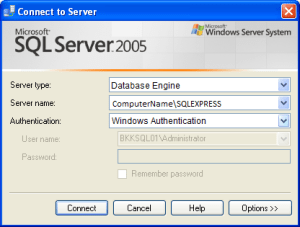
1-  Connecting SQL 2005 :

sqlconnect1

ServerName:  is Your computerName which can be found from your My Computer /This PC ‘s and \SQLEXPRESS .

2-  Connecting SQL 2008 :

sql2png

ServerName:  is Your computerName which can be found from your My Computer /This PC ‘s and \SQLEXPRESS .

3-  Connecting SQL 2012 :

sql3

ServerName:  is Just Your ComputerName