ETL(Extract , Transform and Load) – Part 5 -Introduction to Data warehouse

Creating a Data Flow Task

There are three types of data flow task components in the SSIS :
■■ Data flow source adapters
■■ Data flow transformations
■■ Data flow destination adapters

Defining Data Flow Source Adapters

A data flow source adapter is used to extract data from a source and make it available to other components inside a data flow.

ADO.NET source : This type of  source provides connections to tables or queries through an ADO.NET provider.

CDC source Change Data Capture (CDC) : It allows the retrieval of only changed data (from insert, update, or delete operations) from the source system. It uses an ADO.NET provider to connect to a CDC-enabled table .

Excel source : This source allows extraction from a Microsoft Excel worksheet in an Excel file.

Flat File source : This allows you to extract data from delimited or fixed-width files created with various code pages. It uses the Flat File connection manager.

ODBC source : This source connects to a defined ODBC source by using native ODBC and not the OdbcDataProvider in ADO.NET, as in versions before SQL Server 2012.

OLE DB source :  This source connects to installed OLE DB providers such as SQL Server, SQL Server Analysis Services (SSAS), and Oracle.

Raw File source : The Raw File source reads data from a native SSIS data file that was written by the Raw File destination. Because the representation of the data is native to the source, the data requires no translation and almost no parsing. This means that the Raw File source can read data more quickly than any of the other sources.

XML source: The XML source allows raw data to be extracted from an XML file.

Defining Data Flow Destination Adapters :

Data flow destinations are similar to sources in that they use project or package connections. However, destinations are the endpoints in a data flow task, defining the location to which the data should be put into.

ADO.NET destination:  Used to insert data through an ADO.NET provider.

Data Mining Model Training : Allows you to pass data from the data flow into a data mining model in SSAS.

ADO.NET destination:  Used to insert data through an ADO.NET provider.
Data Mining Model Training Allows you to pass data from the data flow into a data mining model in SSAS.

DataReader destination : Lets you pass data in a ADO.NET recordset that can be programmatically referenced .

Excel destination : Used for writing data into a specific sheet in Excel.

Flat File destination : Allows insertion of data to a flat file such as a comma-delimited or tab delimited file.

ODBC destination ; Allows you to insert data by using an ODBC provider. This is a new component in SQL Server 2012. It supports a batch or row-by-row data access
mode for inserting the data. In a data warehouse environment, the batch mode is recommended, because of large volumes of data.

OLE DB destination :Uses the OLE DB provider to insert rows into a destination system that allows an OLE DB connection.
Partition Processing : Allows an SSAS partition to be processed directly from data flowing through the data flow.

Raw File destination : Stores data in native SSIS format as a binary file. Very useful in scenarios when you need to temporarily stage data—for example, when the destination
server is not available and you do not want to or cannot process the source data again. In SQL Server 2012, the Raw File destination can save all kinds of information (including the comparison flags for string columns).

Using Fast Parse

Fast Parse is a set of operations within SSIS that can be used for very fast loading of flat file data. When you are loading data using the Flat File source adapter and you do not need to parse any locally sensitive data (such as date formats, decimal symbols such as the comma, or currency symbols), SSIS can use the Fast Parse option to load data very quickly. Fast Parse is supported only on a subset of date, time, and integer formats.

To set the Fast Parse property, use the Advanced Editor:
1. Right-click the Flat File source and then click Show Advanced Editor.
2. In the Advanced Editor dialog box, click the Input And Output Properties tab.
3. In the Inputs And Outputs pane, click the column for which you want to enable Fast Parse.
4. In the properties window, expand the Custom Properties node, and then set the
FastParse property to True.

Working with Data Flow Transformations

Transformations give you the ability to modify and manipulate data in the data flow.

Selecting Transformations:

A transformation can operate on one row of data at a time or on several rows of data at once. The operations of some transformations are similar to others; therefore, the transformations can be categorized into natural groupings of similar components. In addition to this natural grouping, this lesson describes the type of blocking that occurs inside the data flow task for each transformation.

There are three types of blocking:
■■ In non-blocking transformations, each row is passed through the transformation without any waits.
■■ A partial-blocking transformation waits until a sufficient number of rows is stored and then it passes them through.
■■ In a blocking transformation, all rows must be read into the transformation before the transformation can pass them through.

Logical Row-Level Transformations

The most common transformations are logical row-level transformations,which perform operations on the row level without needing other rows from the source. These transformations, which logically work at the row level, often perform good .

Some common uses of this type of calculation in data warehouse scenarios include the
creation of calculated columns from multiple source columns, mathematical calculations, conversion of data type values, and the replacement of NULL with other values.

Audit :Adds additional columns to each row based on system package variables such as ExecutionStartTime and PackageName.

Cache Transform :Allows you to write data to a cache with the Cache connection
manager. The data can then be used by the Lookup transformation. This is useful if you are using multiple Lookup transformations against the same data, because SSIS will cache the needed data only once and not for each Lookup .

Character Map : This Performs common text operations such as Uppercase and
allows advanced linguistic bit-conversion operations.

Copy Column: It duplicates column values in each row to a new named
column.

Data Conversion : It Creates a new column in each row based on a new data type converted from the existing column. An example is converting text to numeric data or text to Unicode text.

Derived Conversion : This is the most often used logical row-level transformation because it enables the replacement of column values or the creation of new columns based on existing columns, variables, and parameters. For example : to concatenate firstname column and lastname column to a make a fullname column  !

Multi-Input and Multi-Output Transformations :

The Multi-input and multi-output transformations can work with more than one data input or can generate more than one output, respectively. These transformations enable you to combine multiple branches of data flow paths into one or create multiple branches of data flow paths from one .

Data flow transformation :

CDC Splitter : This Directs stream of changed records into different outputs based on based on type of change (Insert, delete and update) .

Conditional Split: This Routes or filters data based on a Boolean expression to one
or more outputs, from which each row can be sent out only one output path. It routes data rows to different output depending on the content of data. For instance : separate  rows that need to be cleaned from rows that are need to be loaded.

Lookup Performs a lookup operation between a current row and an
external dataset on one or more columns .It joins additional columns to data flow by looking up values in a table. For instance joins to the ’employee id’ column in employee table to get ‘hiredate’  and ’employee name’ .

Merge: This Combines the rows of two similar sorted inputs, one on top of
the other, based on a defined sort key.

Merge Join : Joins the rows of two sorted inputs based on a defined join
column or columns, adding columns from each source.

■■ What is the difference between the Union All and the Merge transformation?

The Merge transformation is similar to Union All, but with Merge, the sources have
to be sorted and the sort position is preserved.

Multi-Row Transformations

Multi-row transformations perform work based on criteria from multiple input rows or generate multiple output rows from a single input row. Multi-row transformations can be more intensive in operation and memory overhead but are crucial for meeting business requirements.

Aggregate Associates rows based on defined grouping and generates aggregations such as SUM, MAX, MIN, and COUNT.

Sort Orders the input based on defined sort columns and sort directions.

Determining Appropriate ETL Strategy and Tools

The volume of data that must be managed by data warehouses is growing every day, and data integration is becoming the biggest issue, with increasing demand for the implementation of different analytical solutions ranging from enterprise data warehouses to specific data marts needed for predictive analytics .

ETL Architecture

Data integration reference architecture defines the processes and environments that support the capture, quality checking, processing, and movement of data, whether it is transactional or bulk, to one or many targets. A typical architecture layer for ETL consists of a process and a landing zone, which is usually inside the database. Each process follows a landing zone. A standard architecture would be:
■■ Extract the data (process)
■■ Initial Staging (landing zone)
■■ Data Quality (process)
■■ Clean Staging (landing zone)
■■ Transformation (process)
■■ Load-ready Publish (landing zone)
■■ Load Enterprise Data Warehouse (process)
■■ Enterprise Data Warehouse (landing zone)
■■ Load Data Marts (process)
■■ Data Marts (landing zone)

Lookup Transformations

When we are inserting data into a data warehouse fact table, we need to get an appropriate data warehouse key (usually a surrogate key) from the dimension table. As you may remember that columns in a fact table include foreign keys and measures, and dimensions in your database define the foreign keys. The Lookup transformation is very useful in an ETL process for solving this problem, because it performs lookups by joining data in input columns with columns in a reference dataset.

Using a Lookup Transformation :

You specify how the reference dataset will be stored in memory by selecting the appropriate cache mode:

■■ Full cache is the default mode. In this mode, the database is queried once during the
pre-execute phase of the data flow, and the entire reference set is stored into memory.
Lookup operations will be very fast during their execution but we should have enough memory.

■■ Partial cache means that the lookup cache is empty at the beginning of the data
flow. When a new row comes in, the Lookup transformation checks its cache for the
matching values. If no match is found, it queries the database. If the match is found
at the database, the values are cached so they can be used the next time a matching
row comes in.

■■ The no cache mode will store only the last matched row, which means that the Lookup transformation will query the database for each row.

■■ What is the difference between the Lookup and Merge Join transformations?

 Answer :

The Lookup transformation does not need a sorted input; it is a non-blocking
transformation, and in cases when more matching rows exist from the referenced
dataset, only the first one will be retrieved. This means that the transformation will
never retrieve more rows than exist in the input rows. With the Merge Join transformation more rows can be retrieved, because all matching data is retrieved.

Using a  Sorting the Data :

The Sort transformation is an expensive in terms of memory and processor usage, and it is also a full blocking transformation. On the other hand, the Merge Join transformation needs sorted input; so the question is, what is the best way to develop the package?
If you are reading the data from a database—either from the staging area or directly from a transactional system—you can put the burden of sorting the data on the underlying database. You achieve this by specifying a custom SQL query with an ORDER BY clause in the Data Source .

SSIS Variables

The SSIS variables can be used to store values that are determined automatically at run time and that are to be used or reused in various elements of the solution. Some variables (such as the time the process started, the name of a dynamically created folder to be used for storing temporary files, or the number of CPUs) are set once .

System and User Variables :

There are two types of SSIS variables:

■■ System variables : representing specific properties of various SSIS objects
(packages, tasks, containers, components, and event handlers). System variables are
read-only; their values are set by SSIS.
■■ User-defined variables : defined by the SSIS developer and used to store various pieces of information acquired or created during execution .

Variable Scope:

The scope of a variable is determined through the SSIS object hierarchy; scope restricts the visibility and accessibility of a variable to a particular branch of the SSIS object hierarchy .

Package-scoped variables can be considered global.
Variables defined at container level are only accessible to that particular container and to other objects it contains .

Property Parameterization :

Property parameterization, allowing specific SSIS object properties to be set dynamically, can be implemented in several ways:

■■ SSIS object properties associated with parameters can be set dynamically from the calling environment—even after deployment.

■■ Explicit assignment of property values from variables is available in some tasks and
components to facilitate the most common use cases and to simplify development.

■■ Assignment through expressions is available for most SSIS object properties, allowing
property values to be computed by using a combination of constants, variables,
parameters, or by using expression functions.

Inferred Dimension Members:

In data warehouse , it is possible for fact records to arrive with a source business key that has not yet been loaded in the dimension table. This problem is known in DW jargon as late-arriving dimensions or early-arriving facts. When inserting records to a fact table that cannot be resolved to a dimension surrogate key, the typical solution is as follows:

1. Insert a row in the dimension table by using the source system key, and assign a surrogate key to this member. Mark this record to indicate that it was populated as an
inferred member by adding a column to your dimension for instance : by adding an InferredMember column and setting its value to True.

2. Use the newly created surrogate key and assign it to the fact record.

3. Change the loading process for the dimension to check whether a record was populated as an inferred member. If this is the case, you must treat all the attributes as Type 1 SCD regardless of your specification, except for the surrogate key and the business key. If you do not, then all Type 2 SCD attributes will create a new row, because the inferred row has no value for this attribute.

Effectively Updating Dimensions

Although the Slowly Changing Dimension transformation is very easy to use and can quickly create the whole data flow process for updating dimensions, be aware that it does not work optimally in terms of performance, and thus it should only be used for small dimensions .

The algorithm for updating a dimension that has Type 1 and Type 2 SCD attributes is as
follows:

1. Check whether the attributes from the source row have changed.

2. Mark rows for Type 1 or Type 2 SCD change depending on the attribute specification for the dimension.

3. Apply the required update logic to the dimension:

■■ For Type 1 SCD, update the row.

■■ For Type 2 SCD, update the current row’s validity to indicate that it was valid until now, and insert the new row.

Set-Based Update Logic

Main reasons why the Slowly Changing Dimension transformation is slow is because it performs row-level SQL updates. That is why it is important to implement set-based logic when you are designing SSIS processes that need to apply Type 1 or Type 2 SCD changes.

Normalization -Part 1

First Normal Form (1NF):

The values should be atomic . There should be no repeating data in a single column. And a Primary Key should be assigned to the table.

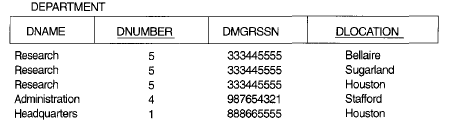
For example : Taking example from Ramaz Elmasri book , consider a company with multiple department locations in USA.

1

The DNumber is the Primary Key . We cannot have multiple values as they are in DLocations column  {Bellaire, Sugarland ,Houston}. They should be atomic. To normalize it to 1NF , we can easily apply the following technique:

  1. As we see, DNumber and DLocations uniquely identify each row , so we can make {DNumber and DLocations} as the combined Primary Key.

2

Second Normal Form (2NF):

For the table to be in 2NF , it should be in 1NF and secondly it should not have any partial dependency (means every non key column should not be dependent partially on the Primary Key) . We can say that every non key column should be fully dependent on the Primary Key.

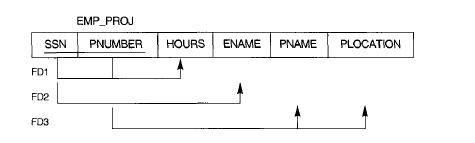
Consider the following table EMP_PROJ:

3

To achieve it into 1NF , make SSN and PNumber the Primary Key .

But what about the functional dependencies ? Remember we told that there should be no partial dependency on part of the Primary Key . Here EName is dependent on SSN !

To further elaborate , consider the following table :

5

Consider the SSN and PNumber as the Primary Key . The functional dependency FD1 , Hours is dependent fully on SSN and PNumber , which is fine according to the 2NF rule as it is fully dependent on PK. But look at FD2 and FD3 , EName is dependent only on SSN which violates our 2NF rule of being fully dependent on whole Key . Also FD3 , PName and PLocation is also dependent on PNumber which also violates the 2NF rule .

To achieve 2NF , we break the tables as the following :

6

The first table above : EP1 consists of the FD1 column Hours which was fully dependent on whole PK {SSN,PNumber}.

EP2 table we made for FD2 , Ename which was dependent on SSN .

EP3 table we made for FD3 , PName and PLocation which was dependent on PNumber .

So in this way we can achieve the 2NF. The EMP_Proj table is now in 2NF .


Third Normal Form (3NF):

For the table to be in 3NF ,it should be in 2NF and there should be no transitive dependency . Which means that any non key column should not be transitively dependent on Primary key.

Transitive dependency : X->Y so Y->Z.

Consider the following table:

7

To explain , see the DNumber column which dependent on SSN. So consider , SSN as X , DNumber as Y  and Dname as Z .  Or we can say the DName and DMGRSSN is dependent on DNumber which is a non Key column .

To achieve , 3NF , we can do the following :

8

We separated the DName and DMGRSSN in a separate table whose PK is DNumber !


Thanks


What is SQL

SQL stands for : Structured Query Language.

Was designed to manage and maintain data in Relational Database Management Systems(RDBMS) which revolves around relational model and predicate logics.

Has three types of statements :

DDL (Data Definition Language)

Statements include :  Create, Alter, Drop

DML (Data Manipulation Language)

Statements include :  Select , Insert, Update, Truncate, Delete

DCL (Data Control Language)     

Statements include :  Grant, Revoke


What is a Database, Schema and Object

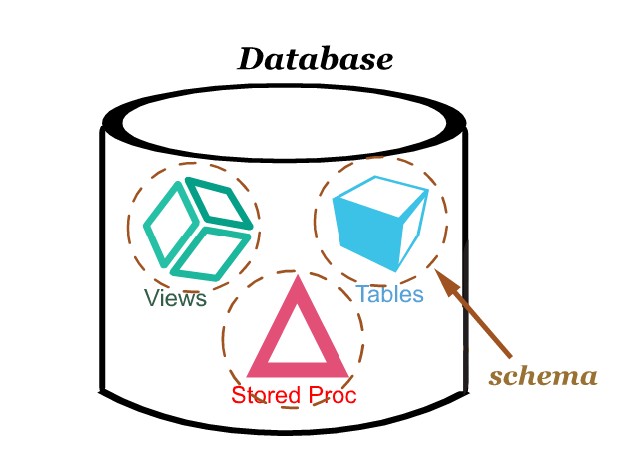
Consider a Database as a main box which contains inside it different boxes(schemas) and those boxes(schemas) contain different objects like (tables,views, stored procedures and functions etc)

  • When It is said that Objects are contained in the Schema ,so the best advantage of the Schema level is Security . You can assign the different users of a database , a certain amount of privileges/rights ;
  • For example:

– Allowing User A : To use only select statements .

– Allowing User B : To see Encrypted Stored Procedures allowing all other privileges.

– Allowing User C : Not giving him rights to delete, update or execute any stored procedure.

The Below picture illustrates the design of Database ,schema and object . A schema can contain multiple objects in it .

objct2

How SQL Processes Select Statements

In this blog , we shall teach how a SQL Processes the select statement .  Processing SQL Statement means here how SQL  sees , perceives and processes and gives the final result of SQL select Statement .

For Example :

=================================================

SELECT studentid, Firstname, Lastname,count(*) as Total

FROM dbo.Student

WHERE Studentid = 10

GROUP BY studentid, Firstname, Lastname

HAVING COUNT(*) > 1

ORDER BY studentid


===============================================

Now note the order of how the Select statements are actually processed IN SQL :

1. FROM
2. WHERE
3. GROUP BY
4. HAVING
5. SELECT
6. ORDER BY

Explanation:

1. Get the rows from the table
2. Chooses only those rows where the studentID is 10
3. Groups the records by studentid, Firstname, Lastname
4. It groups studentid, Firstname, Lastname Having more than one record
5. Select returns for the grouped rows
6. Orders sorts the rows in the output by studentid


The ‘CASE’ Expression

The case statements are similar to the switch cases like in C/C#. The CASE executes the statement which is logically correct and matches the condition.

Take the following example , that the you want to select a particular teachername from the list through teacherId column, from the following table StudentDetail :

Select studentid, studentname, teacherid, teachername  from   StudentDetail 

Using the case expression :

SELECT studentid, studentname, teacherid, teachername
CASE teacherid
WHEN 1 THEN ‘Teacher1’
WHEN 2 THEN ‘Teacher2’
WHEN 3 THEN ‘Teacher3’
WHEN 4 THEN ‘Teacher4’
WHEN 5 THEN ‘Teacher5’
WHEN 6 THEN ‘Teacher6’
WHEN 7 THEN ‘Teacher7’
WHEN 8 THEN ‘Teacher8’
ELSE ‘Unknown’
END
FROM StudentDetail order by studentid

Table Expression

Table query is a named query which is like a relational table which can be used like other tables .

The Microsoft SQL has four types of table expressions and we will go one by one :

1 – Derived tables

2 – CTE (common table expressions)

3 – Views

4 – Inline table valued Function (TVF)

1 – Derived Tables :

Derived tables are the queries which we write in the FROM clause of the outer query and there existence depends on the outer query . Once the outer query is finished , the derived table is finished.

AS we are using the TSQL2012 database , We can execute the

select * from (select custid,companyname from Sales.Customers) as customer

select * from (select custid,companyname from Sales.Customers where city like ‘%Berlin%’ ) as customer
select * from (select orderyear,count(distinct custid) as numcusts
from (select YEAR(orderdate) as orderyear, custid from Sales.Orders) as outer1
group by orderyear) as outer2
where outer2.numcusts > 70

Note : A query must have to meet the requirements of the table expression.

1. The rows returned might not have guaranteed order as the table expression is supposed to represent a relational table .

2 . All columns names in the table expression must be unique for instance : If we join two tables in the table expression and both the tables have columns with same name then we can have a problem. The easiest way is to give column aliases to these columns which have same name.

3. Assign column aliases: The best benefit of table expression is that you can refer the column aliases used in the select of inner query in the outer query. From this we can undertand that the column aliases used in the select clause cannot be used in the where or group by clause because select clause is logically processed after the where and group by clause in SQL .

For example : The following statement will give an error :

select YEAR(orderdate) as orderyear, custid from Sales.Orders) as outer1
group by orderyear)

Msg 207, Level 16, State 1, Line 5
Invalid column name ‘orderyear’.

We can solve this problem by using the YEAR(orderdate) in group by or where clause. But there can be possibility that there can be many expressions or inner queries. So to maintain code readability , we can just give the name to the query for the ease and use that name wherever needed.

SELECT orderyear, COUNT(DISTINCT custid) AS numcusts
FROM (SELECT YEAR(orderdate) AS orderyear, custid
FROM Sales.Orders) AS D
GROUP BY orderyear;

Here we defined a derived table with name D on select year(orderdate) as orderyear , custid  which returns order year and customer ID of all rows . The outer query can refer to orderyear alias of inner query , in the Group By clause and in its select clause .

2 – Common Table Expressions (CTE):

CTE are another type of table expressions . They are defined by WITH statements, have a inner query defining CTE and the outer query which uses against it .

For instance :

WITH USAcustomers as

( select custid, companyname  FROM sales.customers where country = ‘USA’

)

select * from USAcustomers ;


We can also use column aliases in the outer query .

WITH C AS
(
select year(orderdate) as orderyear, custid 
from sales.orders
)

select orderyear , count(distinct custid) as numcasts
from C 
Group by orderyear;

Use the semicolon to end the CTE at the end of outer query.

Multiple CTEs

CTE has several advantages over derived tables. If you need to refer to one CTE from another we don’t end up nesting like we do in derived tables. Instead , when we define multiple CTE we define them by commas under the same WITH statement.

with c1 as 
(
select year(orderdate) as orderyear, custid
from sales.orders
),
c2 as 
(
select orderyear, count(distinct custid) as numcasts
from c1 group by orderyear
)
select orderyear, numcasts from c2 where numcasts > 70

This approach improves the readability and maintainability of the code compared to the nested derived table does.


Recursive CTEs:        

Recursive CTE has recursion capablities. Recursive CTE is defined by two queries. One is called Anchor member and one is called recursive member .

WITH <CTE_Name>[(<target_column_list>)]
AS
(
<anchor_member>
UNION ALL
<recursive_member>
)
<outer_query_against_CTE>;

The anchor member returns a valid result table and is invoked only once .

The recursive member is a query which has reference to the CTE name.

The reference to the CTE name is the result set which is returned by the previous execution. When the first time the recursive member is invoked , the previous result set is whatever the anchor member returned.

In the next invocations , the result set referenced to the CTE name has the result of the previous invocations of the recursive members. The recursive member is invoked repeatedly until it returns an empty set .

Both the queries must be having the same columns and their types.

The reference to the CTE name in the outer query is the unified result sets of the invocation of the anchor member and all invocations of the recursive member .

with EmployeeCTE as 
( select empid, mgrid, firstname, lastname
from hr.employees
where empid = 2 

union all

select c.empid,c.mgrid,c.firstname,c.lastname
from EmployeeCTE p 
inner join HR.Employees as c 
on c.mgrid = p.empid
)
select empid, mgrid,firstname, lastname
from EmployeeCTE

The anchor member queries the HR.Employees table and simply returns the row for employee 2.
SELECT empid, mgrid, firstname, lastname
FROM HR.Employees
WHERE empid = 2

The recursive member joins the CTE—representing the previous result set—with the Employees table to return the direct subordinates of the employees returned in the previous result set.

SELECT C.empid, C.mgrid, C.firstname, C.lastname
FROM EmployeeCTE AS P
JOIN HR.Employees AS C
ON C.mgrid = P.empid

In other words, the recursive member is invoked repeatedly, and in each invocation it returns the next level of subordinates. The first time the recursive member is invoked, it returns the direct subordinates of employee 2—employees 3 and 5. The second time the recursive member is invoked, it returns the direct subordinates of employees 3 and 5—employees 4, 6, 7, 8, and 9. The third time the recursive member is invoked, there are no more subordinates; the recursive member returns an empty set, and therefore recursion stops.

MERGE Statement

We can modify data using (INSERT, Update and delete ) using merge statement based on conditional logic. The format is little different as follows :

We use the target table name in MERGE clause .

And source table in USING clause .

We define merge condition by specifying a predicate in ON clause like as we do in join .

The merge condition defines which of the rows in source table matches with the rows in target table.

In WHEN MATCHED THEN clause we define the action to be taken when rows are matched.

And In WHEN NOT MATCHED THEN we define the action when the rows are not matched.


For example :

MERGE INTO dbo.targettable AS TGT
USING dbo.sourcetable AS SRC
ON TGT.custid = SRC.custid
WHEN MATCHED THEN
UPDATE SET
TGT.personname = SRC.personname,
TGT.phone = SRC.phone,
TGT.address = SRC.address

WHEN NOT MATCHED THEN
INSERT (personid, personname , phone, address)
VALUES (SRC.personid, SRC.personname , SRC.phone, SRC.address);


The MERGE statement defines an UPDATE action when a match is found, setting the target personname , phone, and address values to those of the matched rows from the source table.

The MERGE statement defines an INSERT action when a match is not found, it inserts the rows from the source to the target table


Interview Questions

Q 1 : What are types of system databases:

The following are the types of databases:

Master database holds instance-wide metadata information, server configuration, information about all databases in the instance, and initialization information. the system views contain information about system, hardware, indexes, columns , memory etc.

tempdb The tempdb database is where SQL Server stores temporary data such as work tables, sort space, row versioning information, and so on. SQL Server allows you to create temporary tables for your own use, and the physical location of those temporary tables is tempdb .

Resource The Resource database is a hidden, read-only database that holds the definitions of all system objects. When you query system objects in a database, they appear to reside in the sys schema of the local database, but in actuality their definitions reside in the Resource database. contains information that was
previously in the master database and was split out from the master database to make service pack upgrades easier to install.

Model The model database is used as a template for new databases. Every new database that you create is initially created as a copy of model. So if you want certain objects (such as data types) to appear in all new databases that you create, or certain database properties to be configured in a certain way in all new databases, you need to create those objects and configure those properties in the model database. Note that changes you apply to the model database will not affect existing databases . The contains information that was previously in the master database and was split out from the master database to make service pack upgrades easier to install.

msdb The msdb database is where a service called SQL Server Agent stores its data. SQL Server Agent is in charge of automation, which includes entities such as jobs, schedules, and alerts. The SQL Server Agent is also the service in charge of replication. The msdb database also holds information related to other SQL Server features such as Database Mail, Service Broker, backups, and more.

Q 2 : What is a Filegroup ?

The database is made up of data files and transaction log files . The data files hold object data, and the log files hold information that SQL Server needs to maintain transactions. Data files are organized in logical groups called filegroups.

A filegroup is the target for creating an object, such as a table or an index. The object data will be spread across the files that belong to the target filegroup. Filegroups are your way of controlling the physical locations of your objects.

A database must have at least one filegroup called PRIMARY, and can optionally have other user filegroups as well. The PRIMARY filegroup contains the primary data file (which has an .mdf extension) for the database, and the database’s system catalog. You can optionally add secondary data files (which have an .ndf extension) to PRIMARY. User filegroups contain only secondary data files. You can decide which filegroup is marked as the default filegroup.

This technique can support two main strategies:

Using multiple filegroups can increase performance by separating heavily used tables or indexes onto different disk subsystems.

■ Using multiple filegroups can organize the backup and recovery plan by containing static data in one filegroup and more active data in another filegroup. We can allocate or spread filegroups nd1,nd2…ndn to multiple drives to increase performance.

Q 3 : What is a Primary key?

A primary key constraint enforces uniqueness of rows and also disallows NULL marks in the constraint attributes.

Q 4 : What is a Unique Constraints  ?

A unique constraint enforces the uniqueness of rows, allowing you to implement the concept of alternate keys from the relational model in your database. Unlike with primary keys, you can define multiple unique constraints within the same table. Also, a unique constraint is not restricted to columns defined as NOT NULL.

Q 5  : What is a Foreign Key Constraints  ?

A foreign key enforces referential integrity. This constraint is defined on one or more attributes in what’s called the referencing table and points to candidate key (primary key or unique constraint) attributes in what’s called the referenced table . Note that NULL marks are allowed in the foreign key columns (mgrid in the last example) even if
there are no NULL marks in the referenced candidate key columns.

Q 6 : What is a Check Constraints ? 

A check constraint allows you to define a predicate that a row must meet to be entered into the table or to be modified. For example, the following check constraint ensures that the salary column in the Employees table will support only positive values.
ALTER TABLE dbo.Employees
ADD CONSTRAINT CHK_Employees_salary
CHECK(salary > 0.00);

Q 7 : What is the difference between where and having clause  ?

The WHERE clause is evaluated before rows are grouped, and therefore is evaluated
per row. The HAVING clause is evaluated after rows are grouped, and therefore
is evaluated per group.

Q 8 : Why it is not allowed to refer to a column alias defined by the SELECT
clause in the WHERE clause?

Because the WHERE clause is logically evaluated first in query processing than the SELECT clause.

Q 9 : What is the  performance wise benefits of the WHERE clause ? 

It reduces network traffic and if properly used with indexes can reduce the full table scanning.

Q 10 : What is the difference between self-contained and correlated subqueries?

Self-contained sub queries are independent of the outer query, whereas correlated
sub queries have a reference to an element from the table in the outer query.

Q 11 : What is the difference between the APPLY and JOIN operators?

With a JOIN operator, both inputs represent static relations. With APPLY, the
left side is a static relation, but the right side can be a table expression with
correlations to elements from the left table.

Q 12 : What are two requirements for the queries involved in a set operator ?

The number of columns in the two queries needs to be the same  and the corresponding
columns need to have compatible types.

Q 13 : What makes a query a grouped query?

When you use an aggregate function, a GROUP BY clause, or both.

Q 14 : What are the clauses that you can use to define multiple grouping sets in the
same query?

GROUPING SETS, CUBE, and ROLLUP.

Q 15  : What is the difference between PIVOT and UNPIVOT?

PIVOT rotates data from a state of rows to a state of columns; UNPIVOT rotates
the data from columns to rows.

Q 16 : Can you store indexes from the same full-text catalog to different filegroups?

Yes. A full-text catalog is a virtual object only; full-text indexes are physical objects.
You can store each full-text index from the same catalog to a different file group.

Q 17 : How do you search for synonyms of a word with the CONTAINS predicate?

You have to use the CONTAINS(FTcolumn, ‘FORMSOF(THESAURUS, SearchWord1)’) syntax.

Q 18 : Can a table or column name contain spaces, apostrophes, and other nonstandard characters?

Yes

Q 19 : What types of table compression are available?

Page and row level compression.

Q 20 : How SQL Server enforce uniqueness in both primary key and unique constraints?

SQL Server uses unique indexes to enforce uniqueness for both primary key
and unique constraints.

Q 21 : What type of data does an inline function return?

Inline functions return tables, and accordingly, are often referred to as inline
table-valued functions.

Q 22 : What is difference between view and an inline function ? 

An inline table-valued function can be said as a parameterized view—that is, a
view that takes parameters.

Q 23 : What is the difference between SELECT INTO and INSERT SELECT?

SELECT INTO creates the target table and inserts into it the result of the query.
INSERT SELECT inserts the result of the query into an already existing table.

Q 24: Can we update rows in more than one table in one UPDATE statement?

No, we can use columns from multiple tables as the source, but update only
one table at a time.

Q 25 : How many columns with an IDENTITY property are supported in one table? And How do you obtain a new value from a sequence?

One.

We use NEXT VALUE FOR function for it.

Q 26 : What is the purpose of the ON clause in the MERGE statement?

The ON clause determines whether a source row is matched by a target row,
and whether a target row is matched by a source row. Based on the result of
the predicate, the MERGE statement knows which WHEN clause to activate and
as a result, which action to take against the target.

Q 27 : What are the possible actions in the WHEN MATCHED clause?

UPDATE and DELETE.

Q 28 : How many WHEN MATCHED clauses can a single MERGE statement have?

Two—one with an UPDATE action and one with a DELETE action.

Q 29: Why is it important for SQL Server to maintain the ACID quality of
transactions?

To ensure that the integrity of database data will not be compromised.

Q 30 : How does SQL Server implement transaction durability?

By first writing all changes to the database transaction log before making changes permanently to the database data on disk.

Q 31 : How many ROLLBACKs must be executed in a nested transaction to roll it back?

Only one ROLLBACK. A ROLLBACK always rolls back the entire transaction, no
matter how many levels the transaction has.

Q 32 : How many COMMITs must be executed in a nested transaction to ensure that
the entire transaction is committed?

One COMMIT for each level of the nested transaction. Only the last COMMIT
actually commits the entire transaction.

Q 33 : Can readers block readers?

No  because shared locks are compatible with other shared locks.

Q 34: Can readers block writers?

Yes, even if only momentarily, because any exclusive lock request has to wait
until the shared lock is released.

Q 35 : If two transactions never block each other, can a deadlock between them
result?

No. In order to deadlock, each transaction must already have locked a resource the other transaction wants, resulting in mutual blocking.

Q 36 : Can a SELECT statement be involved in a deadlock?

Yes. If the SELECT statement locks some resource that keeps a second transaction
from finishing, and the SELECT cannot finish because it is blocked by the
same transaction, the deadlock results.

Q 37 : If your session is in the READ COMMITTED isolation level, is it possible for one of your queries to read uncommitted data?

Yes, if the query uses the WITH (NOLOCK) or WITH (READUNCOMMITTED)
table hint where WITH (NOLOCK) ignoring the locks . The session value for the isolation level does not change, just the characteristics for reading that table.

Q 38 : Is there a way to prevent readers from blocking writers and still ensure that
readers only see committed data?

Yes, that is the purpose of the READ COMMITTED SNAPSHOT option within the
READ COMMITTED isolation level. Readers see earlier versions of data changes
for current transactions, not the currently uncommitted data.

Q 39 : What is the result of the parsing phase of query execution?

The result of this phase, if the query passed the syntax check, is a tree of logical
operators known as a parse tree.

Q 40 : How we  measure the amount of disk I/O a query is performing?

We use the SET STATISTICS IO command.

Q 41 : Which DMO gives you detailed text of queries executed?

You can retrieve the text of batches and queries executed from the

sys.dm_exec_sql_text DMO.

Q 42 :What are the two types of parameters for a T-SQL stored procedure? 

A T-SQL stored procedure can have only an input and  a output parameter.

Q 43 : Can a stored procedure span multiple batches of T-SQL code? 

No, a stored procedure can only contain one batch of T-SQL code.

Q 44 : What are the two types of DML triggers that can be created?

You can create AFTER and INSTEAD OF DML-type triggers.

Q 45 : If an AFTER trigger discovers an error, how does it prevent the DML command from completing?

An AFTER trigger issues a THROW or RAISERROR command to cause the transaction
of the DML command to roll back.

Q 46 : What are the two types of table-valued UDFS? And What type of UDF returns only a single value?

You can create inline or multistatement table-valued UDFs. And  scalar UDF returns only a single value.

Q 47 : What kind of clustering key would you select for an OLTP environment?

For an OLTP environment, a short, unique, and sequential clustering key might be
the best choice.

Q 48 : Which clauses of a query should you consider supporting with an index?

The list of the clauses you should consider supporting with an index includes, but
is not limited to, the WHERE, JOIN, GROUP BY, and ORDER BY clauses.

Q 49 : How would you quickly update statistics for the whole database after an upgrade?

We should use the sys.sp_updatestats system procedure .

Q 50  : What are the commands that are required to work with a cursor?

DECLARE, OPEN, FETCH in a loop, CLOSE, and DEALLOCATE.

Q 51 : When using the FAST_FORWARD option in the cursor declaration command,
what does it mean regarding the cursor properties?

It means that the cursor is read-only, forward-only.

Q 52 : How would you determine whether SQL Server used the batch processing mode for a specific iterator?

You can check the iterator’s Actual Execution Mode property.

Q 53 : Would you prefer using plan guides instead of optimizer hints?

With plan guides, you do not need to change the query text.

Q 54 : Why relational model is called set based model ? 

Relational model means that it is based on the concepts of mathematical set theory. SQL queries that query on the SQL tables outputs the rows in the form of sets of rows.

Q 55 : Give example of iterative model? 

Iterative model means the same concept which is used in loop iteration in high level languages such as C or python . In the same way , the iterative model works on rows as they go row by row. They are by comparison slower in performance .Example : Cursors.

Q 56 : What does fast forward cursor means ?

Means that cursor will start from the initiating point to the last element and will not go backward.

Q 57 : What are scopes of temporary tables ?

There are two types of temporary tables in SQL :  local and global.

Local temp tables are visible to the level that created , across the all inner batches and to the all inner levels of call stack.

Global temp tables are where destroyed when the session that created it terminates or destroyed.

Table variables are named with @ sign : @TV1. They are only accessible to batch that created it .They are not visible to across batches at same level and not even to inner levels .

Q 58: What is the difference between temp table and table variable?

Temp tables are similar to regular database tables . Any data changes in temp tables during transaction can be rolled back  . But changes in table variable in a transaction can not be rolled back.

Another difference is performance wise , for temp tables SQL maintains histograms . Means we can see their statistics and work on them to improve performance for instance : we can create indexes on columns for filtering out the data properly.

In case of table variables , it performs the full table scan which decreases the performance.

Q 59 : What does SET NOCOUNT ON do ?

NOCOUNT  ON can remove the messages like : 2 rows affected returned .Putting
a SET NOCOUNT ON at the beginning of  stored procedure prevents  from returning that message to the client.

Q 60 : What does GOTO statement does ?

With GOTO you can jump to the particular label to from where you are at!

For instance :

PRINT ‘First’;
GOTO Label_1;
PRINT ‘Second’;
Label_1:
PRINT ‘End now’;

Q 61 : Can the stored procedure have multiple batches ?

No.

Q 62 : What does RETURN statement do ?

It exits the stored procedure and returns to caller statement or procedure .

Q 63: What does @@Rowcount does?

It counts the number of rows read or affected by the SQL statement .

Q 64: Can the AFTER triggers be nested ?

Yes they can be nested , means that trigger on a table T1 can have a trigger and that inserts rows into table T2 that is also having a trigger on it and so on .
The number of maximum nested triggers SQL can have is 32.

Q 65 : What does SCHEMABINDING statement do?

WITH SCHEMABINDING means that a schema object is dependent or have a some sort of bound with other object . Object can be a table ,view or procedure. For instance : You cannot change the table structure if it is schemabinded with another view until you drop that view.

Q 66 : Can we use multiple select statements in a view ?

No . Only you can use one select statement as it is required that a view returns one result set.

But , you can use union statement with two or more select statements as the final result would be one result set.

Q 67 : Can data be modified in a table with a view ? If yes then what precautions are there?

Yes we can modify data in a table through a view instead of directly modifying through the table.

There are few precautions and restriction that should be taken carefully :

  • The DML statement must use or point to one table only even if the view is made up of or referencing multiple tables.
  • The view column to be modified should not have a aggregate function on it in the table  or a view whose column is resulted from GROUP BY , DISTINCT or HAVING .
  • We cannot modify a view if it is having TOP or offset fetch with the WITH CHECK OPTION.
  • The data in the view column cannot be modified if it is made up from Union, union All , intersect or cross joins.

Q 68 : What are partitioned views?

We can partition large table in SQL with help of views on  one or across several servers. Simply you can use union on partitioned tables and create a view for it. It is called partitioned view. If the table is spread across multiple SQL instances then it is called distributed partitioned view.

Q 69 : What is inline table valued function ? 

It is also a type of view called parameterized view .  The difference is that only it can take parameter to filter the rows from the view.

Q 70 : What is identity?

It is a type of property for a column having a type numeric. We typically use the identity column to generate surrogate keys which are mostly generated by system automatically when you insert the data. It has two values in it . First is seed value which is the first value and second is step value which is incremental value. We define both of these values at definition.

Q 71 : What is SET IDENTITY_INSERT?

We can specify our own values for identity column for insert by SET IDENTITY_INSERT = ON .  But we cannot update identity column value.

Q 72 : How can we find last Identity value?

The SCOPE_IDENTITY returns last identity value which is generated in the session in the current scope (batch, procedure or function) .

The @@IDENTITY returns the last identity value generated in the session inspite what is the scope.

The IDENT_CURRENT takes table as input and returns the last identity value being generated in the given table .

Q 73 : What will happen if we use Scope_Identity , @@Identity and Ident_current in different sessions?

Scope_Identity and @@Identity will return NULL  but Ident_current will return the last value of the identity column whatever the session is.

Q 74 : What is sequence ?

Sequence is an independent object in SQL Server . It is quite like the identity column .

All numeric types are accepted by sequence as like the identity does. But By default is BIGINT.

There are number of properties which identity does not have :

INCREMENT BY : It Increments the value. The default value is 1.

MINVALUE : The minimum value for the type .

MAXVALUE :The maximum value to be given for the type .

CYCLE | NO CYCLE :  It deals if  to allow the sequence to cycle or not. The default value is NO CYCLE.

START WITH : It is the sequence start value.

Q 75 : How can we request next Value in sequence  ?

To request new value from the sequence, run the following code .
SELECT NEXT VALUE FOR tableName;

Q 76 : Can we change the datatype of sequence ? And can we change properties and values ?

No we cannot change the datatype but yes we can change properties and values.

Q 77 : What is cache in sequence ?

This property means writing the sequence value to disk . For instance a CACHE with value 100 means it will write to disk after every 100 . Performance wise using NO CACHE has to write to disk each request of new sequence value. With CACHING performance is good.

Q78 : What is APPLY operator ? 

The APPLY operator works on two input tables in which the second can be a table expression.
And we will refer to them as the “left” and “right” tables and the right table is usually a derived table or an inline table valued function.

The APPLY operator applies the right table expression to each row from the left table and produces a result table with the unified result sets.

We will discuss this in separate post.

Q78 : What is the difference between Cross and outer apply?

The APPLY operator has two types;

CROSS APPLY doesn’t return left rows that get an empty set back from the right side.

The OUTER APPLY preserves the left side, and therefore, does return left rows when the right side returns an empty set. NULLs are used as placeholders from the right side in the outer rows if they are empty.

Q79 : What is Transaction ?

Transaction is a unit of work that has many activities like querying a data and changing multiple data definition statement or queries.

Q80 : What is implicit_transactions? Statement ?

This statement is OFF by default in SQL  . If you do not start your transaction with BEGIN statement it is fine but you have to specify COMMIT OR ROLLBACK TRAN to end the transaction.

Q 81 : Define 4 properties of a transaction ?

Atomicity:  Either all changes in the transaction takes place or None.  If a system fails before a COMMIT in a transaction or there is an error , the transaction is being rolled back.

Consistency : It is the state of data the database gives access to the user .The isolation level is also a part of consistency. Consistency also refers to the integrity rules it follows like (Primary Key , Foreign Key and Unique constraints ) etc .

Isolation :  Isolation level means to handle and control the access level of data and ensure data is in the level of consistency . There are two types of isolation levels : Locking and row versioning .

Durability : It means that the data is durable  . Whenever , the data is changed it is first logged into the Logs of the database before it can be written to disk . Once the data is Committed and written to logs it is considered safe even the system fails.

Q 82 : What is redo and undo ?

If the system fails , when it gets started it checks the logs and replays the data and checks for committed data , if its committed it rolls forward and Redo .

If the data is uncommitted it gets rolled back to previous state once the system is up .

Q 83 : What is a lock ?

Lock is a control resource obtained by the transaction to protect data and prevent data changes or access by another transaction .

Q 84 : What is an Exclusive Lock ? 

When we want to modify a data , the transaction requests an exclusive lock on the data and its resources. If it acquires the exclusive lock it will not allow any other transaction to access or modify data until that transaction releases the lock .

In single statement transaction , the lock is held until the statement completes.

In multi statement transaction , the lock is held until all the statements are executed and the transaction is ended by Commit tran or rollback Tran.

If a transaction is holding any type of lock on a resource then it can not acquire Exclusive lock and no lock can acquire any resource if a transaction is having an Exclusive lock.

Q 85 : What is shared lock ?

When a transaction reads a data , the transaction acquires Shared lock on it and its resources . Multiple transactions can acquire shared locks simultaneously on a same resource.

Q 86 : What is row versioning ? What is READ COMMITTED SNAPSHOT Isolation level ?

In Azure SQL database Read Committed Snapshot is the default isolation level.

Instead of Locking technology , this isolation level works on row versioning , so the transaction does not wait for acquiring shared lock for reading .

In this READ COMMITTED SNAPSHOT isolation level , if the transaction modifies a row and another transaction tries to read the row , it will read the last committed state of the row that was available before the start of the statement (optimistic Concurrency) .

This case is very different in READ COMMITTED isolation level , if the transaction is modifying the row , another transaction cannot read the same rows of data until the first transaction completes (Pessimistic Concurrency ) .

Q 87 : What are lockable resources ? 

Lockable resources are  : RID, rows , tables , pages and database tables.

Q 88 : What is higher level of Granularity ? 

To obtain  lock on a resource , your transaction must first obtain intent locks of the same mode on higher levels of granularity . For example, to get an exclusive lock on a row, your transaction must first acquire an intent exclusive lock on the page where the row resides and an intent exclusive lock on the object that owns the page.

To get a shared lock on a certain level of granularity, your transaction first needs to acquire intent shared locks on higher levels of granularity.

The purpose of intent locks is to efficiently detect incompatible lock requests on higher levels of granularity and prevent the granting of those.

For instance , if a transaction holds a lock on a row and another asks for an incompatible lock mode on the whole page(higher level) or table where that row resides, it is easy for SQL Server to identify the conflict because of the intent locks that the first transaction acquired on the page and table. Intent locks do not interfere with requests for locks on lower levels of granularity. For example, an intent lock on a page doesn’t prevent other transactions from acquiring incompatible lock modes on rows within the page.

Q 89 : What is Blocking ?

When one transaction holds a data resource and another requests for the same resource , so requester gets blocked and enters into the wait state.

Q 90 : What is isolation level  READ UNCOMMITTED ?

It the lowest available isolation level. In this isolation level, a reader doesn’t
ask for a shared lock. A reader that doesn’t ask for a shared lock can never be in conflict with a writer that is holding an exclusive lock. This means that the reader can read uncommitted changes (also known as dirty reads). It also means that the reader won’t interfere with a writer that asks for an exclusive lock. In other words, a writer can change data while a reader that is running under the READ UNCOMMITTED isolation level reads data.

Q 91 : What is the isolation level READ COMMITED ? 

It does not allow dirty reads or uncommitted data . It allows the reader to acquire shared lock to prevent reading the uncommitted data.

This means that if a writer is holding an exclusive lock, the reader’s shared lock request will be in conflict with the writer, and it has to wait.

As soon as the writer commits the transaction, the reader can get its shared lock, but what it reads are necessarily only committed changes.

Q 92 : What is the isolation level REPEATABLE READ ?

It not only does a reader need a shared lock to be able to read, but it also holds the lock until the end of the transaction. This means that as soon as the reader has acquired a shared lock on a data resource to read it, no one can obtain an exclusive lock to modify that resource until the reader ends the transaction.

If a transaction is having a shared lock and it is not committed and it is in repeatable read isolation level, then it will not allow any other transaction to update the data of the first transaction until the first transaction is not committed.

Q 93 :  What is isolation level SERIALIZABLE ?

One problem in REPEATABLE READ is that what if a another transaction enters a new row or rows into the table ? this phenomenon is called Phantom Reads . To overcome this problem , we use the SERIALIZABLE . It blocks the other transaction to enter the new rows.

Database Modeling

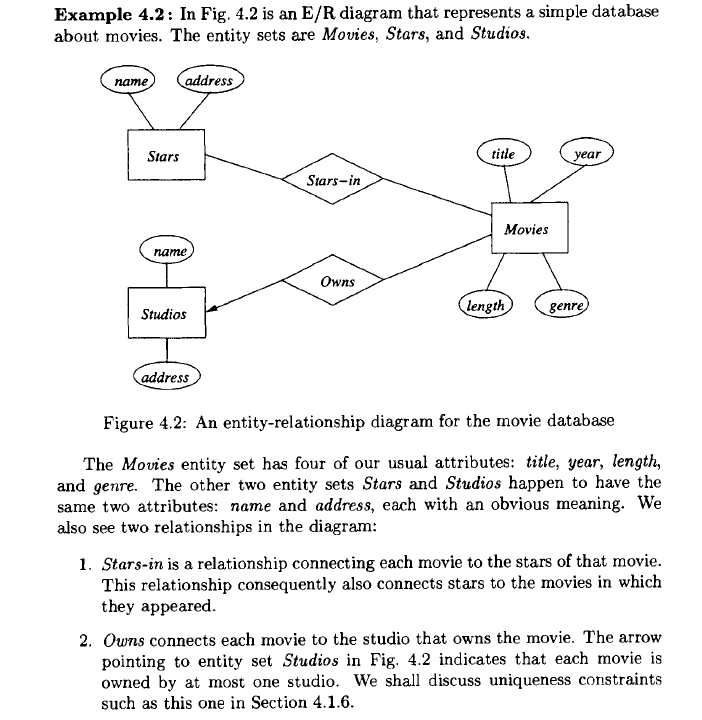
1- Entity :  Entity in database can be said like an object in object oriented program. Here we will take example of movie database . In E-R relationship diagrams they are represented by rectangles.

In the movie database the entities are  : movie, stars and studios.

2 – Attributes :  They are like properties of an entity .  For example movie entity  can have attributes like : Title, length.  They are represented by ovals.

3- Relationships :  The two entities movie and stars can have relationship or can have a connection with each other. The relationship between two entities can be represented by diamond.

Er1

Note here , the arrow towards the studios represents that studio owns a movie .

1 – One to One Relationship : Remember that the arrow means “at most one” .

er2

Here a president can run only one studio and a studio has only one president, so this relationship is one-one, as indicated by the two arrows, one entering each entity set.

2 – Many to one Relationships : 

er3

We have an arrow pointing to entity set Studios, indicating that for a particular star and movie, there is only one studio with which the star has contracted for that movie. However, there are no arrows pointing to entity sets Stars or Movies. A studio may contract with several stars for a movie, and a star may contract with one studio for more than one movie.

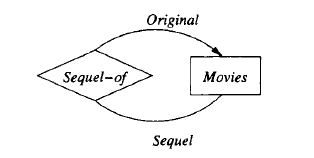
Another relationship can be is a relationship Sequel-of between the entity set Movies and itself. Each relationship is between two movies, one of which is the sequel of the other. To differentiate the two movies in a relationship, one line is labeled by the role Original and one by the role Sequel, indicating the original movie and its sequel, respectively. We assume that a movie may have many sequels, but for each sequel there is only one original movie.

er4


Attributes on Relationships

Sometimes it is conwmient. or even essential, to associate attributes with a
relationship, rather than with any one of the entity sets that the relationship
connects. For example. consider the relationship of Fig. 4.4, which represents
contracts between a star and ~tudio for a rnovie. 1 We might wish to record the
salary associated with this contract. However, we cannot associate it with the
star; a star might get different salaries for different movies. Similarly, it does
not make sense to associate the salary with a studio (they may pay different
salaries to different stars) or with a movie (different stars in a movie may receive
different salaries).

However, we can associate a unique salary with the (star, movie, studio)
triple in the relationship set for the Contracts relationship .

Salaries becomes the fourth entity set of relationship Contracts. The whole diagram is shown in Fig.

Notice that there is an arrow into the Salaries entity set in Fig. 4.8. That
arrow is appropriate, since we know that the salary is determined by all the other
entity sets involved in the relationship. In general, when we do a conversion
from attributes on a relationship to an additional entity set, we place an arrow
into that entity set.

er5


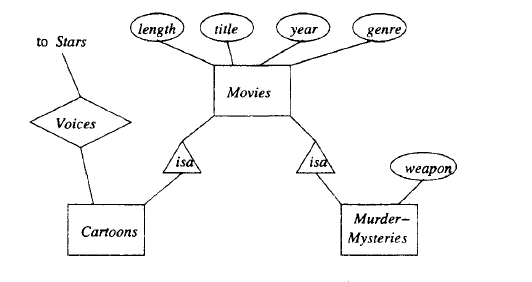
Subclasses in the E/R Model :

Often, an entity set contains certain entities that have special properties not associated with all members of the set. If so, we find it useful to define certain special-case entity sets, or subclasses, each with its own special attributes and/or relationships. We connect an entity set to its subclasses using a relationship called isa (i.e., “an A is a B” expresses an “isa” relationship from entity set A to entity set B).

An isa relationship is a special kind of relationship, and to emphasize that
it is unlike other relationships, we use a special notation: a triangle. One side
of the triangle is attached to the subclass, and the opposite point is connected
to the superclass. Every isa relationship is one-one, although we shall not draw
the two arrows that are associated with other one-one relationships.

er6


Weak Entity Sets :

It is possible for an entity set’s key to be composed of attributes, some or all
of which belong to another entity set. Such an entity set is called a weak entity
set.

Causes of Weak Entity Sets : There are two principal reasons we need weak entity sets. First, sometimes entity sets fall into a hierarchy based on classifications unrelated to the “isa hierarchy” .

Exainple 4.20: A movie studio might have several film crews. The crews
might be designated by a given studio as crew 1, crew 2, and so on. However,
other studios might use the same designations for crews, so the attribute number
is not a key for crews. Rather, to name a crew uniquely, we need to give
both the name of the studio to which it belongs and the number of the crew.
The situation is suggested by Fig. 4.20. The double-rectangle indicates a weak
entity set, and the double-diamond indicates a many-one relationship that helps
provide the key for the weak entity set. The notation will be explained further
in Section 4.4.3. The key for weak entity set Crews is its own number attribute
and the name attribute of the unique studio to which the crew is related by the
many-one Unit-of relationship.


er7


Two or more genera may have species with the same species name. Thus, to
designate a species uniquely we need both the species name and the name of the
genus to which the species is related by the Belongs-to relationship, as suggested
in Fig. 4.21. Species is a weak entity set whose key comes partially from its
genus.

er8


Associations :

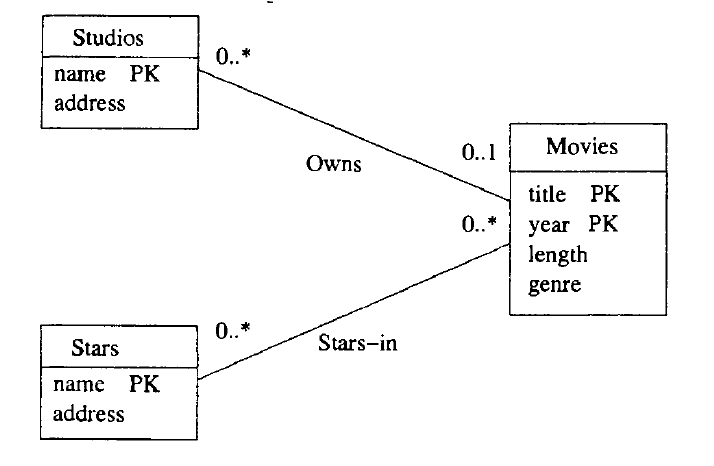
A binary relationship between classes is called an association. There is no analog of multiway relationships in UML. Rather, a multi way relationship has to be broken into binary relationships, which as we suggested in Section 4.1.10, can always be done. The interpretation of an association is exactly what we described for relationships in Section 4.1.5 on relationship sets. The association is a set of pairs of objects, one from each of the classes it connects.

er9


Example 4.37: The UML diagram of Fig. 4.37 is intended to mirror the E/R diagram of Fig. 4.18. Here, we see assumptions somewhat different from those in Example 4.36, about the numbers of movies and studios that can be associated. The label 1..* at the Movies end of Owns says that each studio must own at least one movie (or else it isn’t really a studio). There is still no upper limit on how many movies a studio can own.
At the Studios end of Owns, we see the label 1..1. That label says that a movie must be owned by one studio and only one studio. It is not possible for a movie not to be owned by any studio, as was possible in Fig. 4.36. The label 1..1 says exactly what the rounded arrow in E/R diagrams says.
We also see the association Runs between studios and presidents. At the Studios end we see label 1..1. That is, a president must be the president of one and only one studio. That label reflects the same constraint as the rounded arrow from Presidents to Studios in Fig. 4.18. At the other end of association Runs is the label 0 .. 1. That label says that a studio can have at most one president, but it could not have a president at some time. This constraint is exactly the constraint of a pointed arrow.

er10


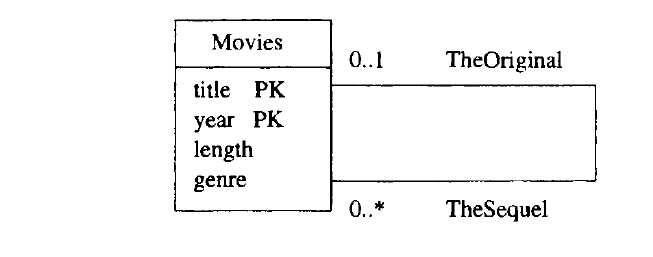
Self-Associations:

An association can have both ends at the same class; such an association is
called a self-association .

Example 4.38: Figure 4.38 represents the relationship “sequel-of’ on movies. We see one association with each end at the class Movies. The end with role TheOriginal points to the original movie, and it has label 0 .. 1. That is, for a movie to be a sequel, there has to be exactly one movie that was the original. However, some movies are not sequels of any movie. The other role, TheSequel has label 0 .. *. The reasoning is that an original can have any number of sequels. Note we take the point of view that there is an original movie for any sequence of sequels, and a sequel is a sequel of the original, not of the previous movie in the sequence. For instance, Rocky II through Rocky V are sequels of Rocky. We do not assume Rocky IV is a sequel of Rocky III, and so on.

er11


Aggregations and Compositions :

An aggregation is a line between two classes that ends in an open diamond at one end. The implication of the diamond is that the label at that end must be 0 .. 1, i.e., the aggregation is a many-one association from the class at the opposite end to the class at the diamond end. Although the aggregation is an association, we do not need to name it, since in practice that name will never be used in a relational implementation.

A composition is similar to an association, but the label at the diamond end must be 1..1. That is, every object at the opposite end from the diamond must be connected to exactly one object at the diamond end. Compositions are distinguished by making the diamond be solid black.er13


Link for more example on aggregation and composition.

https://www.visual-paradigm.com/guide/uml-unified-modeling-language/uml-aggregation-vs-composition/


Cardinality : 

The cardinality of the relationship describes the number of tuples (rows) on each side of the relationship.
Either side of the relationship may be restricted to allow zero, one, or multiple tuples.
The type of key enforces the restriction of multiple tuples. Primary keys are by definition unique and enforce the single-tuple restriction, whereas foreign keys permit multiple tuples.

card1


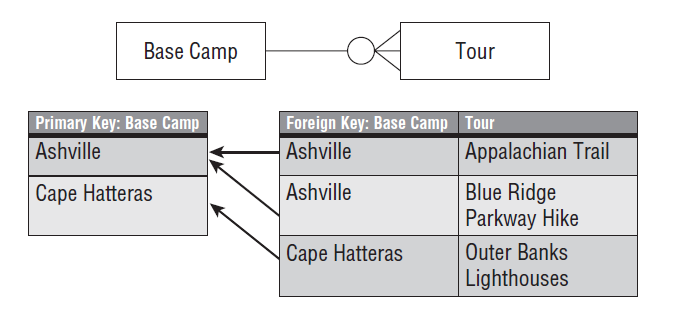
One-to-many pattern : By far the most common relationship is a one-to-many relationship; this is the classic parent-child relationship. Several tuples (rows) in the secondary entity relate to a single tuple in the primary entity. The relationship is between the primary entity’s primary key and the secondary entity’s foreign key .

For instance : each base camp may have several tours that originate from it. Each tour may originate from only one base camp, so the relationship is modeled as one base camp relating to multiple tours. The relationship is made between the BaseCamp’s primary key and the Tour entity’s BaseCampID foreign key, as diagrammed in Figure 3-5. Each Tour’s foreign key attribute contains a copy of its BaseCamp’s primary key.

The one-to-many relationship relates zero to many tuples (rows) in the secondary entity to a single tuple in the primary entity.

card2


One-to-one pattern :

One-to-one relationships connect two entities with primary keys at both entities. Because a primary key must be unique, each side of the relationship is restricted to one tuple .


Many-to-many pattern : 

In a many-to-many relationship, both sides may relate to multiple tuples (rows) on the other side of the relationship. The many-to-many relationship is common in reality, as shown in the following examples:

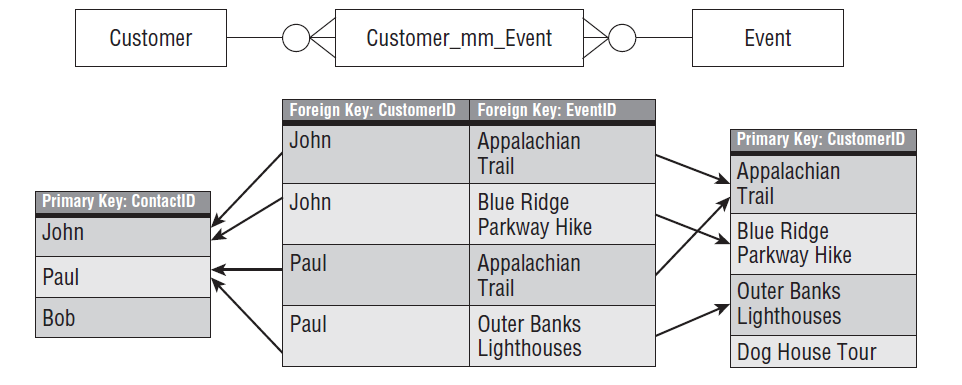
The many-to-many logical model shows multiple tuples on both ends of the relationship. Many-to-many relationships are nearly always optional. For example, the many customers-to-many events relationship is optional because the customer and the tour/event are each valid without the other .
To implement a many-to-many relationship in SQL DDL, a third table, called an associative table (sometimes called a junction table) is used, which artificially creates two one-to-many relationships between the two entities (see Figure 3-8).

Figure shows the associative entity with data to illustrate how it has a foreign key to each of the two many-to-many primary entities. This enables each primary entity to assume a one-to-many relationship with the other entity.

card3

In the associative entity (Customer_mm_Event), each customer can be represented multiple times, which creates an artificial one-event-to-many-customers relationship. Likewise, each event can be listed multiple times in the associative entity, creating a one-customer-to-many-events relationship.

card4


Supertype/subtype pattern

One of my favorite design patterns, that I don’t see used often enough, is the supertype/subtype pattern.
It supports generalization, and I use it extensively in my designs. The supertype/subtype pattern is also perfectly suited to modeling an object-oriented design in a relational database.
The supertype/subtype relationship leverages the one-to-one relationship to connect one supertype entity with one or more subtype entities. This extends the supertype entity with what appears to be flexible attributes.
The textbook example is a database that needs to store multiple types of contacts. All contacts have basic contact data such as name, location, phone number, and so on. Some contacts are customers with customer attributes (credit limits, loyalty programs, etc.). Some contacts are vendors with vendor-specific data.

card5


Reference from First course in Database by J.D  Ullman .