Functional Dependencies

It is essential to have understandings of functional dependencies in normalizing the tables.

“A value X determines value of Y .”  or X->Y.

Which means that it is a constraint that Y is determined by the value of X but this is not Vice versa !

It does not necessarily means that Y determines X.

For instance, In USA , every person has a unique social security No ,referred to as SSN , uniquely identifies each person. So , according to the definition , consider X being the SSN and Y being a person name .

Example :

SSN : 11223344 is assigned to the person ABC . This satisfies the functional dependency SSN -> personName

But vice versa is not necessary that it fulfills the condition . There can be hundreds or thousands of Mr ABC in the USA ! so vice versa cannot satisfy the condition.

Remember the following functional dependency Rules :

  1. Reflexivity : If Y is subset of X , then X determines Y  that is X->Y.

For example : Consider {EmpID,EmpName} -> EmpID , this satisfies the rule of reflexivity because EmpID is a subset of {EmpID,EmpName} .

  2.  Augmentation : If X-> Y , then XZ->YZ .

For example : Consider EmplD being X , EmpName being Y and Z being EmpBirthDate . EmpID -> EmpName , so {EmpID, EmpBirthDate} -> {EmpName , EmpBirthDate} .

      3. Transitive :  If X -> Y and Y -> Z is true, then X-> Z is a transitive dependency.

MovieID, ListID, Genre and Price.

MovieID-> ListID

ListID-> Genre

   4. Decomposition : {X→YZ} |=X→Y.

If a table has two columns which are determined by the same primary key then break them up into two different tables.

5. Union : {X→Y, X→Z} |=X→YZ .

Which means that if X determines Y and X determines Z then Y and Z can be put together in a table depending on the situation because they can be determined by same Primary Key X.

  6. Pseudotransitive : If X-> Y and YW->Z ,then XW->Z .


Thank You

Difference between local and global temp tables

Global Temp Table:

Global temp table starts with ## operator such as ##table1.

They can be used by all other sessions .

Anyone can modify or read data , so you have to be careful !

Global temp table gets destroyed when the creating session is closed or disconnects.

Local Temp Table: 

Local temp table starts with # operator such as #table1.

Local temp tables can be used by only the session which created it and no other session can see or access it.

It is destroyed when the creating session is closed or disconnects. Also , in the creating session , it is only accessible to the level of batch it is created into and automatically destroyed when the temp table goes out of scope of the level.

All temp tables are created in TempDb database of the SQL.

Normalization Exercise # 1

Here we will work on exercise to break the table up till 3NF:

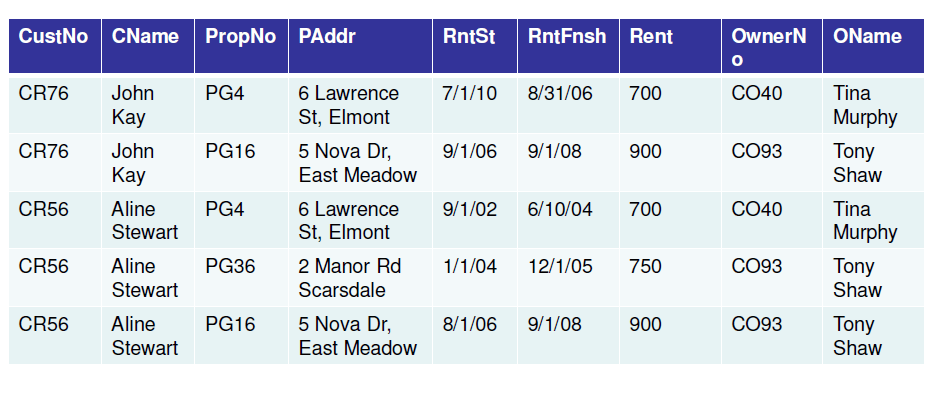
Original Table :

1NF

Making CustNo and PropNo as Primary Keys:

To make things easier , find functional dependencies , so it will make easier for us to break and understand the table :

We have three relations having the following functional dependencies:


– CustNo, PropNo -> RentStart, RentFinish
– CustNo -> CustName
– PropNo ->Paddress, Rent, OwnerName, Oname

As we see the functional dependencies , we can come up with the 2NF:

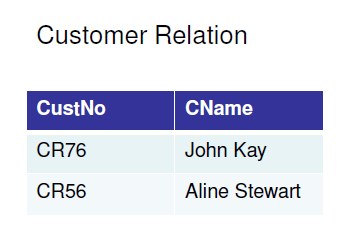
– Customer(CustNo, Cname)
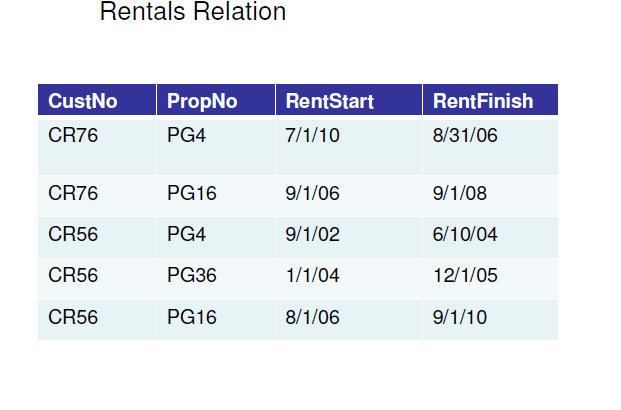
– Rental(CustNo, PropNo, RentStart, RentFinish)
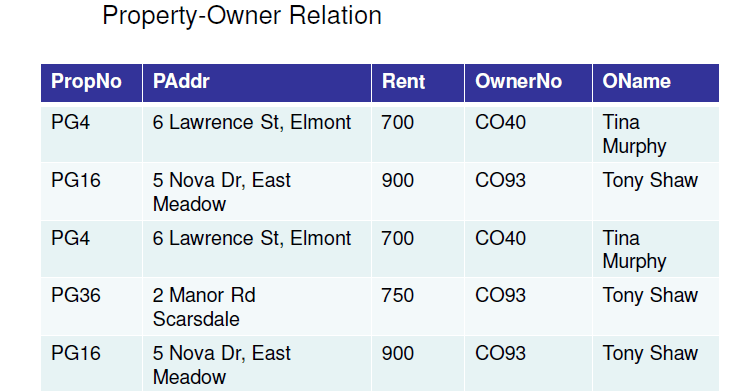
– Property_Owner(PropNo, Paddress, Rent, OwnerNo,OName).

2NF:

In 2NF, there the columns should not be dependent on partial or part of Primary Key.

3NF

No non-primary-key attributes that are transitively dependent on the primary key.

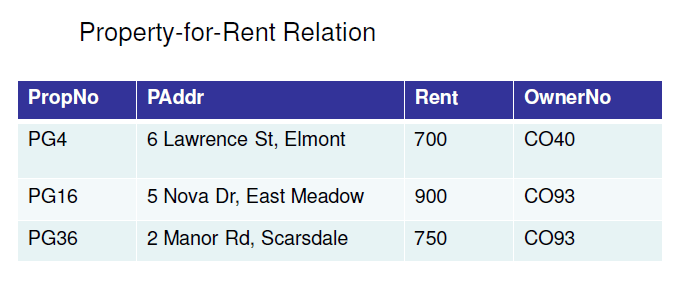
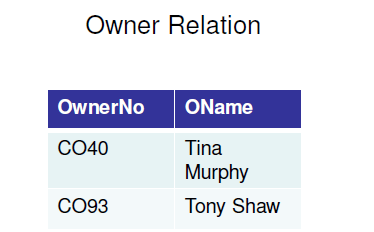
So, We have 4 relations:
• Customer(CustNo, Cname)
• Rental(CustNo, PropNo, RentStart,RentFinish)
• Property_For_Rent(PropNo, Paddress, Rent, OwnerNo)
• Owner(OwnerNo, OName)

DML Queries in SQL

DML is one of the building block of SQL DML queries are used to manipulate the data and they are useful to manage data in the database.

This article will describe all the DML queries one by one with examples.We will use following sample table, Tbl_Sample_Details , in this article,

S_NO              Name                 Country

1                     Faran                  Pakistan

2                      Alex                     USA

Following are the commands that are part of DML queries,

  • Select
  • Insert
  • Update
  • Delete
  • Merge
  • Call
  • Explain Plan
  • Lock Table

Select Command:

The Select command is a simple and most basic command in Microsoft SQL. It is used to fetch data from a database table. Following is the syntax,

Select * from Tbl_Sample_Details

The above query will fetch complete table details,

S_NO              Name                 Country

1                     Faran                  Pakistan

2                      Alex                     USA

Insert Command:

The Insert Command is used to insert data into the database table. Following is the syntax,

Insert into Tbl_Sample_Details values (3, ‘Ahmed’, ‘Pakistan’)

The above query will insert a 3rd row in the table, the resulting table will look like this,

S_NO              Name                 Country

1                     Faran                  Pakistan

2                      Alex                     USA

3                      Ahmed               Pakistan

Update Command:

The Update Command will update the current records in the table, the following query updates Alex into David.

Update Tbl_Sample_Details set Name = ‘David’ where Name = ‘Alex’

S_NO              Name                 Country

1                     Faran                  Pakistan

2                      David                     USA

3                      Ahmed               Pakistan

Delete Command:

The Delete command deletes a specific record from the table. Following query deletes row 2 from the table.

Delete from Tbl_Sample_Details where name = ‘David’

S_NO              Name                 Country

1                     Faran                  Pakistan

3                      Ahmed               Pakistan

Merge Command:

Using the Merge Command you can perform insert, update or delete operations in a single statement. The Merge statement was introduced in SQL Server 2008.


Update or insert of view or function ” failed because it contains a derived or constant field.

Many users encounter this issue while updating , inserting or deleting data from views .

Following is the link from MSDN which can clear the background while encountering the issue :

https://technet.microsoft.com/en-us/library/ms187956.aspx

Please read the updatable Views and Partitioned Views section in the above link .

For Instance : You will not be able to update the below View because a  View whose columns are a result of set operators like union , union all , intersect from other views or tables .

Create VIEW
[myview]
as
select a,b,c from X
union
select a,b,c from Y

Thanks

General overview of Truncate and Delete Statements in SQL

Truncate :

This statement removes all rows from the SQL table . The Truncate statement frees the space used by the truncated table . It does not create logs and adds additional space to memory.


Delete:

This statement removes specified rows as required by user in the WHERE clause from the SQL table . However, the Deleted needs to be Commit or Rollback in the SQL.The deleted data is stored in form of Logs ,so the deleted data can be reverted back to original state or in short ‘Undo’ the delete statement . Moreover , when logs are made , it creates additional space in the memory . So , we can say that Delete is costly statement when it comes to memory !


Thanks

Recent Google Maps API issue:This page didn’t load Google Maps correctly. See the JavaScript console for technical details.

I was recently working on a project in which I used the Google Maps API , I came across an error : This page didn’t load Google Maps correctly. See the JavaScript console for technical details . 

Resolution : 

I checked in the console tab in Developer tools in my internet Explorer , which threw the below error:

Google Maps API error: MissingKeyMapError https://developers.google.com/maps/documentation/javascript/error-messages#missing-key-map-error

So , I searched google support for this issue and found the solution on the below link:

https://developers.google.com/maps/documentation/javascript/get-api-key

Hit the Get A Key button and get your key to insert in your respective code , for example :

Key :  SyCj0as435MQBpLO5aLr9ArAurPARU   

Just add the key in the script calling the maps like this :

<script async defer src=”https://maps.googleapis.com/maps/api/js?key=SyCj0as435MQBpLO5aLr9ArAurPARU&callback=initialize”>


Thanks

*= operator Does not work in SQL 2012 and beyond

The *= operator has been depreciated in new SQL Servers starting from 2012.

The alternate you can use is the left join instead of *= .For Example

 Old Code :

SELECT * FROM table1 a , table2 b

Where a.ID *= b.ID

 Alternate New Code:

SELECT * FROM table1 a left join table2 b

on a.ID = b.MinID


The same is the case with =* operator in which right join is the alternate.

Thanks

Query to find and filter rows/records for the last month in a table

The following query is for finding records in a table which  belong to previous(last) month. This can be useful for finding records and creating reports on those records’ basis for example : Number of patients for last month in a hospital , total number of transactions done for last month in a bank , etc .

select * from table where
datepart(m,yourdatecolumn) = DATEPART(m,DATEADD(m,-1,getdate())) AND 
DATEPART(yyyy, yourdatecolumn) = DATEPART(yyyy, DATEADD(m, -1, getdate()))