Author: Ahmed Mujtaba

Interview Questions

Q 1 : What are types of system databases:

The following are the types of databases:

Master database holds instance-wide metadata information, server configuration, information about all databases in the instance, and initialization information. the system views contain information about system, hardware, indexes, columns , memory etc.

tempdb The tempdb database is where SQL Server stores temporary data such as work tables, sort space, row versioning information, and so on. SQL Server allows you to create temporary tables for your own use, and the physical location of those temporary tables is tempdb .

Resource The Resource database is a hidden, read-only database that holds the definitions of all system objects. When you query system objects in a database, they appear to reside in the sys schema of the local database, but in actuality their definitions reside in the Resource database. contains information that was
previously in the master database and was split out from the master database to make service pack upgrades easier to install.

Model The model database is used as a template for new databases. Every new database that you create is initially created as a copy of model. So if you want certain objects (such as data types) to appear in all new databases that you create, or certain database properties to be configured in a certain way in all new databases, you need to create those objects and configure those properties in the model database. Note that changes you apply to the model database will not affect existing databases . The contains information that was previously in the master database and was split out from the master database to make service pack upgrades easier to install.

msdb The msdb database is where a service called SQL Server Agent stores its data. SQL Server Agent is in charge of automation, which includes entities such as jobs, schedules, and alerts. The SQL Server Agent is also the service in charge of replication. The msdb database also holds information related to other SQL Server features such as Database Mail, Service Broker, backups, and more.

Q 2 : What is a Filegroup ?

The database is made up of data files and transaction log files . The data files hold object data, and the log files hold information that SQL Server needs to maintain transactions. Data files are organized in logical groups called filegroups.

A filegroup is the target for creating an object, such as a table or an index. The object data will be spread across the files that belong to the target filegroup. Filegroups are your way of controlling the physical locations of your objects.

A database must have at least one filegroup called PRIMARY, and can optionally have other user filegroups as well. The PRIMARY filegroup contains the primary data file (which has an .mdf extension) for the database, and the database’s system catalog. You can optionally add secondary data files (which have an .ndf extension) to PRIMARY. User filegroups contain only secondary data files. You can decide which filegroup is marked as the default filegroup.

This technique can support two main strategies:

Using multiple filegroups can increase performance by separating heavily used tables or indexes onto different disk subsystems.

■ Using multiple filegroups can organize the backup and recovery plan by containing static data in one filegroup and more active data in another filegroup. We can allocate or spread filegroups nd1,nd2…ndn to multiple drives to increase performance.

Q 3 : What is a Primary key?

A primary key constraint enforces uniqueness of rows and also disallows NULL marks in the constraint attributes.

Q 4 : What is a Unique Constraints  ?

A unique constraint enforces the uniqueness of rows, allowing you to implement the concept of alternate keys from the relational model in your database. Unlike with primary keys, you can define multiple unique constraints within the same table. Also, a unique constraint is not restricted to columns defined as NOT NULL.

Q 5  : What is a Foreign Key Constraints  ?

A foreign key enforces referential integrity. This constraint is defined on one or more attributes in what’s called the referencing table and points to candidate key (primary key or unique constraint) attributes in what’s called the referenced table . Note that NULL marks are allowed in the foreign key columns (mgrid in the last example) even if
there are no NULL marks in the referenced candidate key columns.

Q 6 : What is a Check Constraints ? 

A check constraint allows you to define a predicate that a row must meet to be entered into the table or to be modified. For example, the following check constraint ensures that the salary column in the Employees table will support only positive values.
ALTER TABLE dbo.Employees
ADD CONSTRAINT CHK_Employees_salary
CHECK(salary > 0.00);

Q 7 : What is the difference between where and having clause  ?

The WHERE clause is evaluated before rows are grouped, and therefore is evaluated
per row. The HAVING clause is evaluated after rows are grouped, and therefore
is evaluated per group.

Q 8 : Why it is not allowed to refer to a column alias defined by the SELECT
clause in the WHERE clause?

Because the WHERE clause is logically evaluated first in query processing than the SELECT clause.

Q 9 : What is the  performance wise benefits of the WHERE clause ? 

It reduces network traffic and if properly used with indexes can reduce the full table scanning.

Q 10 : What is the difference between self-contained and correlated subqueries?

Self-contained sub queries are independent of the outer query, whereas correlated
sub queries have a reference to an element from the table in the outer query.

Q 11 : What is the difference between the APPLY and JOIN operators?

With a JOIN operator, both inputs represent static relations. With APPLY, the
left side is a static relation, but the right side can be a table expression with
correlations to elements from the left table.

Q 12 : What are two requirements for the queries involved in a set operator ?

The number of columns in the two queries needs to be the same  and the corresponding
columns need to have compatible types.

Q 13 : What makes a query a grouped query?

When you use an aggregate function, a GROUP BY clause, or both.

Q 14 : What are the clauses that you can use to define multiple grouping sets in the
same query?

GROUPING SETS, CUBE, and ROLLUP.

Q 15  : What is the difference between PIVOT and UNPIVOT?

PIVOT rotates data from a state of rows to a state of columns; UNPIVOT rotates
the data from columns to rows.

Q 16 : Can you store indexes from the same full-text catalog to different filegroups?

Yes. A full-text catalog is a virtual object only; full-text indexes are physical objects.
You can store each full-text index from the same catalog to a different file group.

Q 17 : How do you search for synonyms of a word with the CONTAINS predicate?

You have to use the CONTAINS(FTcolumn, ‘FORMSOF(THESAURUS, SearchWord1)’) syntax.

Q 18 : Can a table or column name contain spaces, apostrophes, and other nonstandard characters?

Yes

Q 19 : What types of table compression are available?

Page and row level compression.

Q 20 : How SQL Server enforce uniqueness in both primary key and unique constraints?

SQL Server uses unique indexes to enforce uniqueness for both primary key
and unique constraints.

Q 21 : What type of data does an inline function return?

Inline functions return tables, and accordingly, are often referred to as inline
table-valued functions.

Q 22 : What is difference between view and an inline function ? 

An inline table-valued function can be said as a parameterized view—that is, a
view that takes parameters.

Q 23 : What is the difference between SELECT INTO and INSERT SELECT?

SELECT INTO creates the target table and inserts into it the result of the query.
INSERT SELECT inserts the result of the query into an already existing table.

Q 24: Can we update rows in more than one table in one UPDATE statement?

No, we can use columns from multiple tables as the source, but update only
one table at a time.

Q 25 : How many columns with an IDENTITY property are supported in one table? And How do you obtain a new value from a sequence?

One.

We use NEXT VALUE FOR function for it.

Q 26 : What is the purpose of the ON clause in the MERGE statement?

The ON clause determines whether a source row is matched by a target row,
and whether a target row is matched by a source row. Based on the result of
the predicate, the MERGE statement knows which WHEN clause to activate and
as a result, which action to take against the target.

Q 27 : What are the possible actions in the WHEN MATCHED clause?

UPDATE and DELETE.

Q 28 : How many WHEN MATCHED clauses can a single MERGE statement have?

Two—one with an UPDATE action and one with a DELETE action.

Q 29: Why is it important for SQL Server to maintain the ACID quality of
transactions?

To ensure that the integrity of database data will not be compromised.

Q 30 : How does SQL Server implement transaction durability?

By first writing all changes to the database transaction log before making changes permanently to the database data on disk.

Q 31 : How many ROLLBACKs must be executed in a nested transaction to roll it back?

Only one ROLLBACK. A ROLLBACK always rolls back the entire transaction, no
matter how many levels the transaction has.

Q 32 : How many COMMITs must be executed in a nested transaction to ensure that
the entire transaction is committed?

One COMMIT for each level of the nested transaction. Only the last COMMIT
actually commits the entire transaction.

Q 33 : Can readers block readers?

No  because shared locks are compatible with other shared locks.

Q 34: Can readers block writers?

Yes, even if only momentarily, because any exclusive lock request has to wait
until the shared lock is released.

Q 35 : If two transactions never block each other, can a deadlock between them
result?

No. In order to deadlock, each transaction must already have locked a resource the other transaction wants, resulting in mutual blocking.

Q 36 : Can a SELECT statement be involved in a deadlock?

Yes. If the SELECT statement locks some resource that keeps a second transaction
from finishing, and the SELECT cannot finish because it is blocked by the
same transaction, the deadlock results.

Q 37 : If your session is in the READ COMMITTED isolation level, is it possible for one of your queries to read uncommitted data?

Yes, if the query uses the WITH (NOLOCK) or WITH (READUNCOMMITTED)
table hint where WITH (NOLOCK) ignoring the locks . The session value for the isolation level does not change, just the characteristics for reading that table.

Q 38 : Is there a way to prevent readers from blocking writers and still ensure that
readers only see committed data?

Yes, that is the purpose of the READ COMMITTED SNAPSHOT option within the
READ COMMITTED isolation level. Readers see earlier versions of data changes
for current transactions, not the currently uncommitted data.

Q 39 : What is the result of the parsing phase of query execution?

The result of this phase, if the query passed the syntax check, is a tree of logical
operators known as a parse tree.

Q 40 : How we  measure the amount of disk I/O a query is performing?

We use the SET STATISTICS IO command.

Q 41 : Which DMO gives you detailed text of queries executed?

You can retrieve the text of batches and queries executed from the

sys.dm_exec_sql_text DMO.

Q 42 :What are the two types of parameters for a T-SQL stored procedure? 

A T-SQL stored procedure can have only an input and  a output parameter.

Q 43 : Can a stored procedure span multiple batches of T-SQL code? 

No, a stored procedure can only contain one batch of T-SQL code.

Q 44 : What are the two types of DML triggers that can be created?

You can create AFTER and INSTEAD OF DML-type triggers.

Q 45 : If an AFTER trigger discovers an error, how does it prevent the DML command from completing?

An AFTER trigger issues a THROW or RAISERROR command to cause the transaction
of the DML command to roll back.

Q 46 : What are the two types of table-valued UDFS? And What type of UDF returns only a single value?

You can create inline or multistatement table-valued UDFs. And  scalar UDF returns only a single value.

Q 47 : What kind of clustering key would you select for an OLTP environment?

For an OLTP environment, a short, unique, and sequential clustering key might be
the best choice.

Q 48 : Which clauses of a query should you consider supporting with an index?

The list of the clauses you should consider supporting with an index includes, but
is not limited to, the WHERE, JOIN, GROUP BY, and ORDER BY clauses.

Q 49 : How would you quickly update statistics for the whole database after an upgrade?

We should use the sys.sp_updatestats system procedure .

Q 50  : What are the commands that are required to work with a cursor?

DECLARE, OPEN, FETCH in a loop, CLOSE, and DEALLOCATE.

Q 51 : When using the FAST_FORWARD option in the cursor declaration command,
what does it mean regarding the cursor properties?

It means that the cursor is read-only, forward-only.

Q 52 : How would you determine whether SQL Server used the batch processing mode for a specific iterator?

You can check the iterator’s Actual Execution Mode property.

Q 53 : Would you prefer using plan guides instead of optimizer hints?

With plan guides, you do not need to change the query text.

Q 54 : Why relational model is called set based model ? 

Relational model means that it is based on the concepts of mathematical set theory. SQL queries that query on the SQL tables outputs the rows in the form of sets of rows.

Q 55 : Give example of iterative model? 

Iterative model means the same concept which is used in loop iteration in high level languages such as C or python . In the same way , the iterative model works on rows as they go row by row. They are by comparison slower in performance .Example : Cursors.

Q 56 : What does fast forward cursor means ?

Means that cursor will start from the initiating point to the last element and will not go backward.

Q 57 : What are scopes of temporary tables ?

There are two types of temporary tables in SQL :  local and global.

Local temp tables are visible to the level that created , across the all inner batches and to the all inner levels of call stack.

Global temp tables are where destroyed when the session that created it terminates or destroyed.

Table variables are named with @ sign : @TV1. They are only accessible to batch that created it .They are not visible to across batches at same level and not even to inner levels .

Q 58: What is the difference between temp table and table variable?

Temp tables are similar to regular database tables . Any data changes in temp tables during transaction can be rolled back  . But changes in table variable in a transaction can not be rolled back.

Another difference is performance wise , for temp tables SQL maintains histograms . Means we can see their statistics and work on them to improve performance for instance : we can create indexes on columns for filtering out the data properly.

In case of table variables , it performs the full table scan which decreases the performance.

Q 59 : What does SET NOCOUNT ON do ?

NOCOUNT  ON can remove the messages like : 2 rows affected returned .Putting
a SET NOCOUNT ON at the beginning of  stored procedure prevents  from returning that message to the client.

Q 60 : What does GOTO statement does ?

With GOTO you can jump to the particular label to from where you are at!

For instance :

PRINT ‘First’;
GOTO Label_1;
PRINT ‘Second’;
Label_1:
PRINT ‘End now’;

Q 61 : Can the stored procedure have multiple batches ?

No.

Q 62 : What does RETURN statement do ?

It exits the stored procedure and returns to caller statement or procedure .

Q 63: What does @@Rowcount does?

It counts the number of rows read or affected by the SQL statement .

Q 64: Can the AFTER triggers be nested ?

Yes they can be nested , means that trigger on a table T1 can have a trigger and that inserts rows into table T2 that is also having a trigger on it and so on .
The number of maximum nested triggers SQL can have is 32.

Q 65 : What does SCHEMABINDING statement do?

WITH SCHEMABINDING means that a schema object is dependent or have a some sort of bound with other object . Object can be a table ,view or procedure. For instance : You cannot change the table structure if it is schemabinded with another view until you drop that view.

Q 66 : Can we use multiple select statements in a view ?

No . Only you can use one select statement as it is required that a view returns one result set.

But , you can use union statement with two or more select statements as the final result would be one result set.

Q 67 : Can data be modified in a table with a view ? If yes then what precautions are there?

Yes we can modify data in a table through a view instead of directly modifying through the table.

There are few precautions and restriction that should be taken carefully :

  • The DML statement must use or point to one table only even if the view is made up of or referencing multiple tables.
  • The view column to be modified should not have a aggregate function on it in the table  or a view whose column is resulted from GROUP BY , DISTINCT or HAVING .
  • We cannot modify a view if it is having TOP or offset fetch with the WITH CHECK OPTION.
  • The data in the view column cannot be modified if it is made up from Union, union All , intersect or cross joins.

Q 68 : What are partitioned views?

We can partition large table in SQL with help of views on  one or across several servers. Simply you can use union on partitioned tables and create a view for it. It is called partitioned view. If the table is spread across multiple SQL instances then it is called distributed partitioned view.

Q 69 : What is inline table valued function ? 

It is also a type of view called parameterized view .  The difference is that only it can take parameter to filter the rows from the view.

Q 70 : What is identity?

It is a type of property for a column having a type numeric. We typically use the identity column to generate surrogate keys which are mostly generated by system automatically when you insert the data. It has two values in it . First is seed value which is the first value and second is step value which is incremental value. We define both of these values at definition.

Q 71 : What is SET IDENTITY_INSERT?

We can specify our own values for identity column for insert by SET IDENTITY_INSERT = ON .  But we cannot update identity column value.

Q 72 : How can we find last Identity value?

The SCOPE_IDENTITY returns last identity value which is generated in the session in the current scope (batch, procedure or function) .

The @@IDENTITY returns the last identity value generated in the session inspite what is the scope.

The IDENT_CURRENT takes table as input and returns the last identity value being generated in the given table .

Q 73 : What will happen if we use Scope_Identity , @@Identity and Ident_current in different sessions?

Scope_Identity and @@Identity will return NULL  but Ident_current will return the last value of the identity column whatever the session is.

Q 74 : What is sequence ?

Sequence is an independent object in SQL Server . It is quite like the identity column .

All numeric types are accepted by sequence as like the identity does. But By default is BIGINT.

There are number of properties which identity does not have :

INCREMENT BY : It Increments the value. The default value is 1.

MINVALUE : The minimum value for the type .

MAXVALUE :The maximum value to be given for the type .

CYCLE | NO CYCLE :  It deals if  to allow the sequence to cycle or not. The default value is NO CYCLE.

START WITH : It is the sequence start value.

Q 75 : How can we request next Value in sequence  ?

To request new value from the sequence, run the following code .
SELECT NEXT VALUE FOR tableName;

Q 76 : Can we change the datatype of sequence ? And can we change properties and values ?

No we cannot change the datatype but yes we can change properties and values.

Q 77 : What is cache in sequence ?

This property means writing the sequence value to disk . For instance a CACHE with value 100 means it will write to disk after every 100 . Performance wise using NO CACHE has to write to disk each request of new sequence value. With CACHING performance is good.

Q78 : What is APPLY operator ? 

The APPLY operator works on two input tables in which the second can be a table expression.
And we will refer to them as the “left” and “right” tables and the right table is usually a derived table or an inline table valued function.

The APPLY operator applies the right table expression to each row from the left table and produces a result table with the unified result sets.

We will discuss this in separate post.

Q78 : What is the difference between Cross and outer apply?

The APPLY operator has two types;

CROSS APPLY doesn’t return left rows that get an empty set back from the right side.

The OUTER APPLY preserves the left side, and therefore, does return left rows when the right side returns an empty set. NULLs are used as placeholders from the right side in the outer rows if they are empty.

Q79 : What is Transaction ?

Transaction is a unit of work that has many activities like querying a data and changing multiple data definition statement or queries.

Q80 : What is implicit_transactions? Statement ?

This statement is OFF by default in SQL  . If you do not start your transaction with BEGIN statement it is fine but you have to specify COMMIT OR ROLLBACK TRAN to end the transaction.

Q 81 : Define 4 properties of a transaction ?

Atomicity:  Either all changes in the transaction takes place or None.  If a system fails before a COMMIT in a transaction or there is an error , the transaction is being rolled back.

Consistency : It is the state of data the database gives access to the user .The isolation level is also a part of consistency. Consistency also refers to the integrity rules it follows like (Primary Key , Foreign Key and Unique constraints ) etc .

Isolation :  Isolation level means to handle and control the access level of data and ensure data is in the level of consistency . There are two types of isolation levels : Locking and row versioning .

Durability : It means that the data is durable  . Whenever , the data is changed it is first logged into the Logs of the database before it can be written to disk . Once the data is Committed and written to logs it is considered safe even the system fails.

Q 82 : What is redo and undo ?

If the system fails , when it gets started it checks the logs and replays the data and checks for committed data , if its committed it rolls forward and Redo .

If the data is uncommitted it gets rolled back to previous state once the system is up .

Q 83 : What is a lock ?

Lock is a control resource obtained by the transaction to protect data and prevent data changes or access by another transaction .

Q 84 : What is an Exclusive Lock ? 

When we want to modify a data , the transaction requests an exclusive lock on the data and its resources. If it acquires the exclusive lock it will not allow any other transaction to access or modify data until that transaction releases the lock .

In single statement transaction , the lock is held until the statement completes.

In multi statement transaction , the lock is held until all the statements are executed and the transaction is ended by Commit tran or rollback Tran.

If a transaction is holding any type of lock on a resource then it can not acquire Exclusive lock and no lock can acquire any resource if a transaction is having an Exclusive lock.

Q 85 : What is shared lock ?

When a transaction reads a data , the transaction acquires Shared lock on it and its resources . Multiple transactions can acquire shared locks simultaneously on a same resource.

Q 86 : What is row versioning ? What is READ COMMITTED SNAPSHOT Isolation level ?

In Azure SQL database Read Committed Snapshot is the default isolation level.

Instead of Locking technology , this isolation level works on row versioning , so the transaction does not wait for acquiring shared lock for reading .

In this READ COMMITTED SNAPSHOT isolation level , if the transaction modifies a row and another transaction tries to read the row , it will read the last committed state of the row that was available before the start of the statement (optimistic Concurrency) .

This case is very different in READ COMMITTED isolation level , if the transaction is modifying the row , another transaction cannot read the same rows of data until the first transaction completes (Pessimistic Concurrency ) .

Q 87 : What are lockable resources ? 

Lockable resources are  : RID, rows , tables , pages and database tables.

Q 88 : What is higher level of Granularity ? 

To obtain  lock on a resource , your transaction must first obtain intent locks of the same mode on higher levels of granularity . For example, to get an exclusive lock on a row, your transaction must first acquire an intent exclusive lock on the page where the row resides and an intent exclusive lock on the object that owns the page.

To get a shared lock on a certain level of granularity, your transaction first needs to acquire intent shared locks on higher levels of granularity.

The purpose of intent locks is to efficiently detect incompatible lock requests on higher levels of granularity and prevent the granting of those.

For instance , if a transaction holds a lock on a row and another asks for an incompatible lock mode on the whole page(higher level) or table where that row resides, it is easy for SQL Server to identify the conflict because of the intent locks that the first transaction acquired on the page and table. Intent locks do not interfere with requests for locks on lower levels of granularity. For example, an intent lock on a page doesn’t prevent other transactions from acquiring incompatible lock modes on rows within the page.

Q 89 : What is Blocking ?

When one transaction holds a data resource and another requests for the same resource , so requester gets blocked and enters into the wait state.

Q 90 : What is isolation level  READ UNCOMMITTED ?

It the lowest available isolation level. In this isolation level, a reader doesn’t
ask for a shared lock. A reader that doesn’t ask for a shared lock can never be in conflict with a writer that is holding an exclusive lock. This means that the reader can read uncommitted changes (also known as dirty reads). It also means that the reader won’t interfere with a writer that asks for an exclusive lock. In other words, a writer can change data while a reader that is running under the READ UNCOMMITTED isolation level reads data.

Q 91 : What is the isolation level READ COMMITED ? 

It does not allow dirty reads or uncommitted data . It allows the reader to acquire shared lock to prevent reading the uncommitted data.

This means that if a writer is holding an exclusive lock, the reader’s shared lock request will be in conflict with the writer, and it has to wait.

As soon as the writer commits the transaction, the reader can get its shared lock, but what it reads are necessarily only committed changes.

Q 92 : What is the isolation level REPEATABLE READ ?

It not only does a reader need a shared lock to be able to read, but it also holds the lock until the end of the transaction. This means that as soon as the reader has acquired a shared lock on a data resource to read it, no one can obtain an exclusive lock to modify that resource until the reader ends the transaction.

If a transaction is having a shared lock and it is not committed and it is in repeatable read isolation level, then it will not allow any other transaction to update the data of the first transaction until the first transaction is not committed.

Q 93 :  What is isolation level SERIALIZABLE ?

One problem in REPEATABLE READ is that what if a another transaction enters a new row or rows into the table ? this phenomenon is called Phantom Reads . To overcome this problem , we use the SERIALIZABLE . It blocks the other transaction to enter the new rows.
Database Modeling

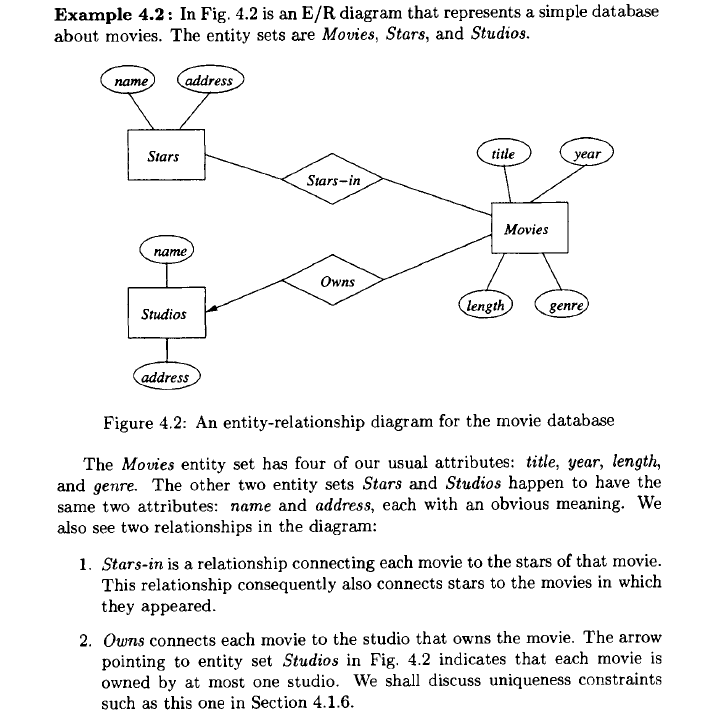
1- Entity :  Entity in database can be said like an object in object oriented program. Here we will take example of movie database . In E-R relationship diagrams they are represented by rectangles.

In the movie database the entities are  : movie, stars and studios.

2 – Attributes :  They are like properties of an entity .  For example movie entity  can have attributes like : Title, length.  They are represented by ovals.

3- Relationships :  The two entities movie and stars can have relationship or can have a connection with each other. The relationship between two entities can be represented by diamond.

Er1

Note here , the arrow towards the studios represents that studio owns a movie .

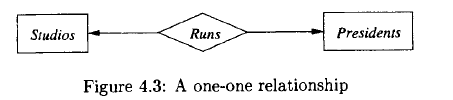
1 – One to One Relationship : Remember that the arrow means “at most one” .

er2

Here a president can run only one studio and a studio has only one president, so this relationship is one-one, as indicated by the two arrows, one entering each entity set.

2 – Many to one Relationships : 

er3

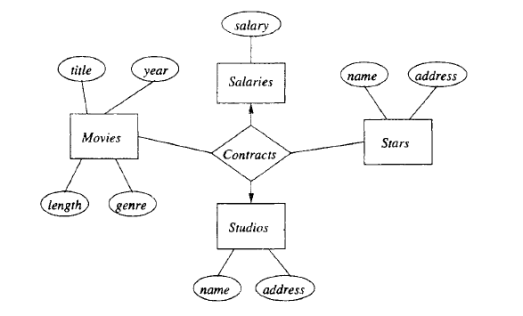
We have an arrow pointing to entity set Studios, indicating that for a particular star and movie, there is only one studio with which the star has contracted for that movie. However, there are no arrows pointing to entity sets Stars or Movies. A studio may contract with several stars for a movie, and a star may contract with one studio for more than one movie.

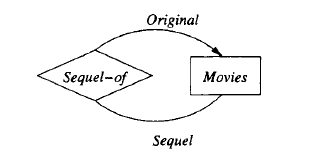
Another relationship can be is a relationship Sequel-of between the entity set Movies and itself. Each relationship is between two movies, one of which is the sequel of the other. To differentiate the two movies in a relationship, one line is labeled by the role Original and one by the role Sequel, indicating the original movie and its sequel, respectively. We assume that a movie may have many sequels, but for each sequel there is only one original movie.

er4


Attributes on Relationships

Sometimes it is conwmient. or even essential, to associate attributes with a
relationship, rather than with any one of the entity sets that the relationship
connects. For example. consider the relationship of Fig. 4.4, which represents
contracts between a star and ~tudio for a rnovie. 1 We might wish to record the
salary associated with this contract. However, we cannot associate it with the
star; a star might get different salaries for different movies. Similarly, it does
not make sense to associate the salary with a studio (they may pay different
salaries to different stars) or with a movie (different stars in a movie may receive
different salaries).

However, we can associate a unique salary with the (star, movie, studio)
triple in the relationship set for the Contracts relationship .

Salaries becomes the fourth entity set of relationship Contracts. The whole diagram is shown in Fig.

Notice that there is an arrow into the Salaries entity set in Fig. 4.8. That
arrow is appropriate, since we know that the salary is determined by all the other
entity sets involved in the relationship. In general, when we do a conversion
from attributes on a relationship to an additional entity set, we place an arrow
into that entity set.

er5


Subclasses in the E/R Model :

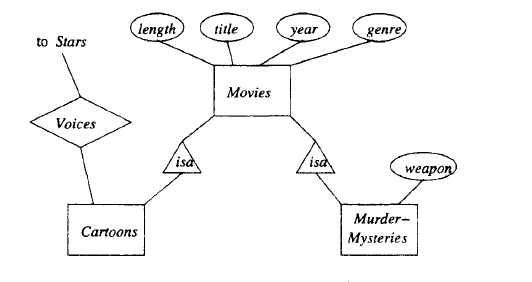
Often, an entity set contains certain entities that have special properties not associated with all members of the set. If so, we find it useful to define certain special-case entity sets, or subclasses, each with its own special attributes and/or relationships. We connect an entity set to its subclasses using a relationship called isa (i.e., “an A is a B” expresses an “isa” relationship from entity set A to entity set B).

An isa relationship is a special kind of relationship, and to emphasize that
it is unlike other relationships, we use a special notation: a triangle. One side
of the triangle is attached to the subclass, and the opposite point is connected
to the superclass. Every isa relationship is one-one, although we shall not draw
the two arrows that are associated with other one-one relationships.

er6


Weak Entity Sets :

It is possible for an entity set’s key to be composed of attributes, some or all
of which belong to another entity set. Such an entity set is called a weak entity
set.

Causes of Weak Entity Sets : There are two principal reasons we need weak entity sets. First, sometimes entity sets fall into a hierarchy based on classifications unrelated to the “isa hierarchy” .

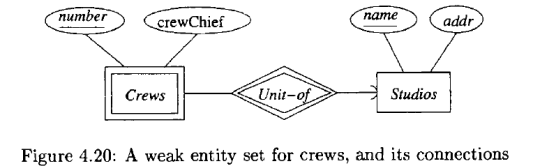
Exainple 4.20: A movie studio might have several film crews. The crews
might be designated by a given studio as crew 1, crew 2, and so on. However,
other studios might use the same designations for crews, so the attribute number
is not a key for crews. Rather, to name a crew uniquely, we need to give
both the name of the studio to which it belongs and the number of the crew.
The situation is suggested by Fig. 4.20. The double-rectangle indicates a weak
entity set, and the double-diamond indicates a many-one relationship that helps
provide the key for the weak entity set. The notation will be explained further
in Section 4.4.3. The key for weak entity set Crews is its own number attribute
and the name attribute of the unique studio to which the crew is related by the
many-one Unit-of relationship.


er7


Two or more genera may have species with the same species name. Thus, to
designate a species uniquely we need both the species name and the name of the
genus to which the species is related by the Belongs-to relationship, as suggested
in Fig. 4.21. Species is a weak entity set whose key comes partially from its
genus.

er8


Associations :

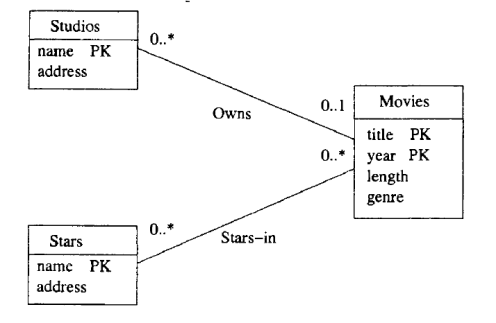
A binary relationship between classes is called an association. There is no analog of multiway relationships in UML. Rather, a multi way relationship has to be broken into binary relationships, which as we suggested in Section 4.1.10, can always be done. The interpretation of an association is exactly what we described for relationships in Section 4.1.5 on relationship sets. The association is a set of pairs of objects, one from each of the classes it connects.

er9


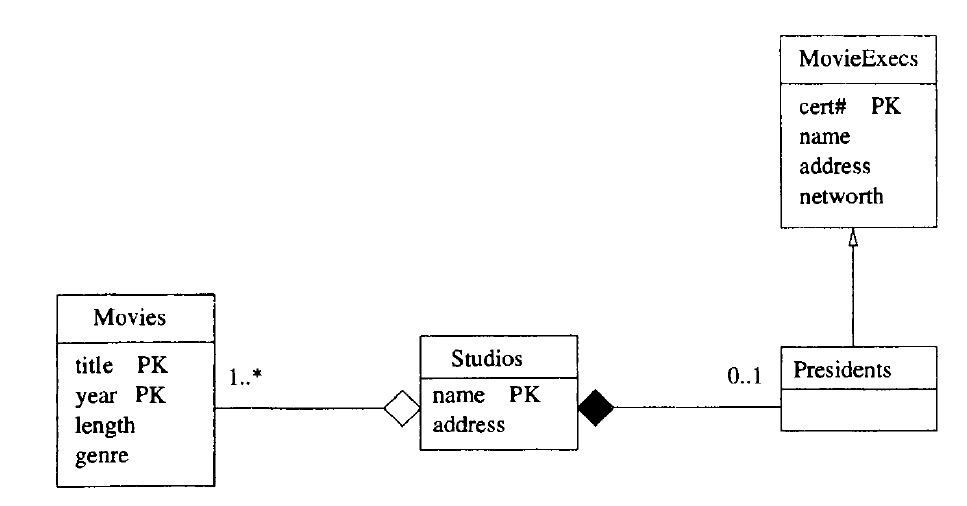
Example 4.37: The UML diagram of Fig. 4.37 is intended to mirror the E/R diagram of Fig. 4.18. Here, we see assumptions somewhat different from those in Example 4.36, about the numbers of movies and studios that can be associated. The label 1..* at the Movies end of Owns says that each studio must own at least one movie (or else it isn’t really a studio). There is still no upper limit on how many movies a studio can own.
At the Studios end of Owns, we see the label 1..1. That label says that a movie must be owned by one studio and only one studio. It is not possible for a movie not to be owned by any studio, as was possible in Fig. 4.36. The label 1..1 says exactly what the rounded arrow in E/R diagrams says.
We also see the association Runs between studios and presidents. At the Studios end we see label 1..1. That is, a president must be the president of one and only one studio. That label reflects the same constraint as the rounded arrow from Presidents to Studios in Fig. 4.18. At the other end of association Runs is the label 0 .. 1. That label says that a studio can have at most one president, but it could not have a president at some time. This constraint is exactly the constraint of a pointed arrow.

er10


Self-Associations:

An association can have both ends at the same class; such an association is
called a self-association .

Example 4.38: Figure 4.38 represents the relationship “sequel-of’ on movies. We see one association with each end at the class Movies. The end with role TheOriginal points to the original movie, and it has label 0 .. 1. That is, for a movie to be a sequel, there has to be exactly one movie that was the original. However, some movies are not sequels of any movie. The other role, TheSequel has label 0 .. *. The reasoning is that an original can have any number of sequels. Note we take the point of view that there is an original movie for any sequence of sequels, and a sequel is a sequel of the original, not of the previous movie in the sequence. For instance, Rocky II through Rocky V are sequels of Rocky. We do not assume Rocky IV is a sequel of Rocky III, and so on.

er11


Aggregations and Compositions :

An aggregation is a line between two classes that ends in an open diamond at one end. The implication of the diamond is that the label at that end must be 0 .. 1, i.e., the aggregation is a many-one association from the class at the opposite end to the class at the diamond end. Although the aggregation is an association, we do not need to name it, since in practice that name will never be used in a relational implementation.

A composition is similar to an association, but the label at the diamond end must be 1..1. That is, every object at the opposite end from the diamond must be connected to exactly one object at the diamond end. Compositions are distinguished by making the diamond be solid black.er13


Link for more example on aggregation and composition.

https://www.visual-paradigm.com/guide/uml-unified-modeling-language/uml-aggregation-vs-composition/


Cardinality : 

The cardinality of the relationship describes the number of tuples (rows) on each side of the relationship.
Either side of the relationship may be restricted to allow zero, one, or multiple tuples.
The type of key enforces the restriction of multiple tuples. Primary keys are by definition unique and enforce the single-tuple restriction, whereas foreign keys permit multiple tuples.

card1


One-to-many pattern : By far the most common relationship is a one-to-many relationship; this is the classic parent-child relationship. Several tuples (rows) in the secondary entity relate to a single tuple in the primary entity. The relationship is between the primary entity’s primary key and the secondary entity’s foreign key .

For instance : each base camp may have several tours that originate from it. Each tour may originate from only one base camp, so the relationship is modeled as one base camp relating to multiple tours. The relationship is made between the BaseCamp’s primary key and the Tour entity’s BaseCampID foreign key, as diagrammed in Figure 3-5. Each Tour’s foreign key attribute contains a copy of its BaseCamp’s primary key.

The one-to-many relationship relates zero to many tuples (rows) in the secondary entity to a single tuple in the primary entity.

card2


One-to-one pattern :

One-to-one relationships connect two entities with primary keys at both entities. Because a primary key must be unique, each side of the relationship is restricted to one tuple .


Many-to-many pattern : 

In a many-to-many relationship, both sides may relate to multiple tuples (rows) on the other side of the relationship. The many-to-many relationship is common in reality, as shown in the following examples:

The many-to-many logical model shows multiple tuples on both ends of the relationship. Many-to-many relationships are nearly always optional. For example, the many customers-to-many events relationship is optional because the customer and the tour/event are each valid without the other .
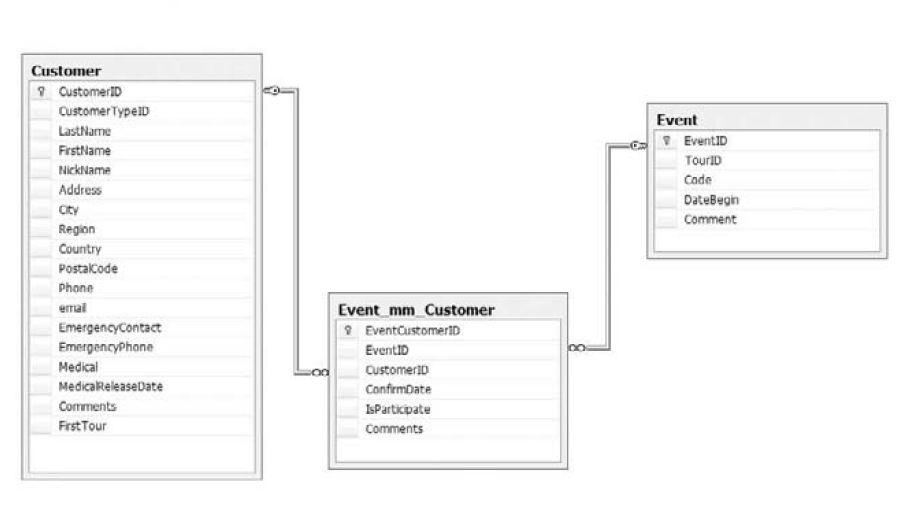
To implement a many-to-many relationship in SQL DDL, a third table, called an associative table (sometimes called a junction table) is used, which artificially creates two one-to-many relationships between the two entities (see Figure 3-8).

Figure shows the associative entity with data to illustrate how it has a foreign key to each of the two many-to-many primary entities. This enables each primary entity to assume a one-to-many relationship with the other entity.

card3

In the associative entity (Customer_mm_Event), each customer can be represented multiple times, which creates an artificial one-event-to-many-customers relationship. Likewise, each event can be listed multiple times in the associative entity, creating a one-customer-to-many-events relationship.

card4


Supertype/subtype pattern

One of my favorite design patterns, that I don’t see used often enough, is the supertype/subtype pattern.
It supports generalization, and I use it extensively in my designs. The supertype/subtype pattern is also perfectly suited to modeling an object-oriented design in a relational database.
The supertype/subtype relationship leverages the one-to-one relationship to connect one supertype entity with one or more subtype entities. This extends the supertype entity with what appears to be flexible attributes.
The textbook example is a database that needs to store multiple types of contacts. All contacts have basic contact data such as name, location, phone number, and so on. Some contacts are customers with customer attributes (credit limits, loyalty programs, etc.). Some contacts are vendors with vendor-specific data.

card5


Reference from First course in Database by J.D  Ullman .

Working with Indexing-Part 2

There are two major types of indexes which SQL servers uses : clustered and Non clustered Indexes.

Before diving into the indexes ,we need to understand the internal organization and data structures used for indexing.

The SQL server stores the data in the memory called pages. Each page is of 8KB unit size and page is also the smallest unit for reading and writing operations of data.

 HEAPS and Balanced Trees:

Pages are physical level objects . SQL servers organizes the pages in logical level structures.

The table organized using the balanced tree data structure is called clustered index or clustered table.

And the table organized using the heaps data structure is called non clustered index .

Heaps

A heap is just a bunch of pages and extents which does not use logical structure. SQL Server keeps the track of which pages and extents belong to which object (table or index etc) through the page allocation system called Index Allocation Map (IAM) pages.

Every table or index has at least one IAM page, called first IAM.

A single IAM page can point to approximately 4 GB of space. Large objects can have more than one IAM page. IAM pages for an object are organized as a doubly linked list; each page has a pointer to its previous or next page.

SQL Server finds data in a heap only by scanning the entire heap and it uses IAM pages to scan heaps in physical order. Even if your query wants to retrieve only a single row, SQL Server has to scan the entire heap.

SQL Server stores new rows anywhere in a heap. It can store a new row in an existing page if the page is not full, or allocate a new page or extent for the object where you are inserting the new row. Of course, this means that heaps can become very fragmented after a period of time.

1- Clustered Index

There can be only one clustered index on a table because the data in a table can only be stored in only one order. The data is stored in order of their key values and if the table is not having the clustered index then it will be stored in non clustered index which stores rows in unsorted form called heap.

In clustered index the table is stored in balanced tree form . Every balanced tree of table has a one root page and at least one or more leaf pages and the data is stored in leaf levels.

The data is stored in order of the clustering key (a key can be a single column or multiple columns up to 16) and if it is more than a single column it is called composite key.

As told earlier , the clustered index uses logical level ordering . SQL still uses the IAM to go to the physical page and It can have zero or more intermediate level

Pages above leaf level point to leaf-level pages. A row in a page above leaf level contains
a clustering key and a pointer to a page where this value starts in logically ordered
leaf level.
If more than one page is needed to point to leaf-level pages, SQL Server creates the
first intermediate-level pages, which point to leaf-level pages. The root page rows point to intermediate-level pages. If the root page cannot point to all first-level intermediate pages, SQL Server creates a new intermediate level.

Pages on the same level are organized as a doubly linked list; therefore, SQL Server can find the previous and the next page in logical order for any specific page. In addition to balanced tree pages . Still , SQL Server uses IAM pages to track physical allocation of the balanced tree pages.

2- Non Clustered Index

We can have 999 non clustered indexes on a single table.

The structure of the non clustered index seems allmost same as clustered index. It has a root level and the intermediate level. Only the leaf level structure is different as it may or may not contain data and it depends whether table is structured as heap or balanced Tree .

The leaf level of a non clustered index contains the index keys and row locators and row locator points to actual row in the table. If the table is a heap, then the row locator is called row identifier (RID).

In order to seek for a row, SQL Server needs to traverse the index to the leaf level, and
then read the appropriate page from the heap and retrieve the row from the page. The operation of retrieving the row from the heap is called RID lookup.

If the table is organized as balanced tree, then the row locator is the clustering key which
means that when SQL seeks for a row, it has to first go to the levels on a non clustered index and then also all levels of a clustered index. This operation is called a key lookup.


Review Topics for SSAS – OLAP

SSAS works best with database schemas that are designed to support data analytics and reporting needs. You achieve such schemas by reducing the number of tables available for reporting, denormalizing data, and simplifying the database schema. The methodology you use to architect such schemas is called dimensional modeling.

After the dimensional schema is in place, you can build the Unified Dimensional Model
(UDM), also known as an SSAS cube, on top of it. The cube is a logical storage object that combines dimensions and measures to provide a multidimensional view of data .

The UDM consists of several components, as follows:

 Data source Represents a connection to the database where the data is stored. SSAS uses the data source to retrieve data and load the UDM objects when you process them.

Data source view (DSV ) : It is just like views. Abstracts the underlying database schema. Although a DSV might seem redundant, it can be very useful by letting you augment the schema. For example, you can add calculated columns to a DSV when security policies prevent you from changing the database schema .

A data source view consists of a set of one or more logical tables with each table representing a saved SQL select statement. This feature has a number of advantages. It allows you to add or modify the underlying database design to fit your current needs without breaking the cubes. If the underlying database changes, modify the data source view to present the database as it was before the change. Additionally, if the data warehouse is not designed the way you would like it to be, you can modify the data source view to mimic your ideal data warehouse design.

Dimensional model :After you’ve created a DSV, the next step is to build the cube
dimensional model. The result of this process is the cube definition, consisting of measures and dimensions with attribute and/or multilevel hierarchies.

Named Queries :  Each data source view table is a select statement. You can modify these select statements and join data to them from more than one SQL Server table. In our example, the Titles dimension includes both the DimTitles and DimPublishers tables in a snowflake pattern .

Named Calculation : As its name suggests, a named calculation is a column based on an expression.Named calculations allow you to modify a portion of the underlying SQL statement that is used by a data source view. A named calculation is similar to a named query, except that you add only a SQL expression to an existing statement, rather than using a whole SQL statement.

sql1sql2

Dimensions

The Attributes :

KeyColumns : A collection of one or more columns uniquely identifying one row from
another in the dimension table (for example, 1, 2, or 3).

Name :The logical name of an attribute.

NameColumn: The values that are displayed in the client application when a particular
attribute is selected (for example, Red, Green, or Blue).

Type : The type of data the attribute represents (for example, day, month, or year) .


The Hierarchies Pane :

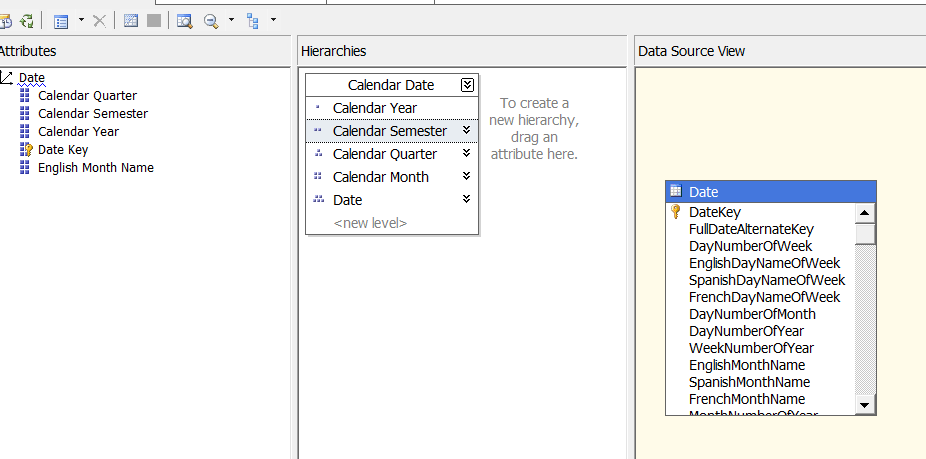
When you first create a dimension, each attribute is independent of each other, but user hierarchies allow you to group attributes into one or more parent-child relationships. Each relationship forms a new level of the hierarchy and provides reporting software with a way to browse data as a collection of levels-based attributes .

sql4


Cubes:

After the cube has been created, the cube needs to be configured and validated. Configuring a cube means modifying the cube to fit your needs, whereas validating a cube means verifying that the cube’s configuration is viable.

Cube Structure :  Sets the properties for measures and measure groups
Dimension Usage: Maps connections between each dimension and measure group
Calculations :Adds additional MDX calculations to your cube
KPIs: Adds key performance indicator measures to your cube
Actions :Adds additional actions such as drill through and hyperlinks
Partitions :Divides measures and dimensions for fine-tuning aggregations to be stored
on the hard drive.
Aggregations :Finds which aggregations should be stored on the hard drive
Perspectives Defines SQL view–like structures for your cube.
Translations  : Adds additional natural languages to the captions of your cube
Browser Browses the cube from the development environment .


Calculated members :

The Calculations tab enables you to create named MDX expressions, also known as calculated members . Typically these calculated members are used to create additional measures, but they can also be used to create additional dimensional attributes.

An example of an additional measure is acquiring the total price of an individual sale by multiplying the quantity by the price of the product. An additional dimensional member example is combining countries into groups such as combining Mexico, Canada, and the United States into one member called North America.

By default, all new calculated members are created on the Measures dimension. Calculated members in the Measures dimension go by a special name, known as calculated measures.

calcmeasure

Calculated Members vs. Derived Members

Calculated members use MDX expressions to create new members to the measures or other dimensions.
Derived members use SQL expressions to create new members on the measures or other dimensions. Derived members are created in SSAS by modifying the SQL code behind each table in a data source view. This can be somewhat confusing, so let’s review the difference between calculated members and derived members.

Listing 11-3. SQL Code for a Derived Measure
SELECT
FactSales.OrderNumber
, FactSales.OrderDateKey
, FactSales.TitleKey
, FactSales.StoreKey
, FactSales.SalesQuantity
— Adding derived measures
, DimTitles.TitlePrice as [CurrentStdPrice]
, (DimTitles.TitlePrice * FactSales.SalesQuantity) as DerivedTotalPrice
FROM FactSales
INNER JOIN DimTitles
ON FactSales.TitleKey = DimTitles.TitleKey

KPIs :A key performance indicator (KPI) is a way of grouping measures together into five basic categories. The five basic categories start at -1 and proceed to a +1 using an increment of ( -1, -0.50, 0, +0.50, and +1). The numbering system may seem odd to some, but it has to do with the science of statistics. Because of this, SSAS uses only these five categories, and they cannot be redefined.

The idea behind a KPI is for you to reduce the number of individual values in a tabular report to the essence of those values. This is convenient when you have a large report and what you really want to see is whether something has achieved a predefined target value, exceeded it, or did not make it to that value.
KPIs can be created in programming code such as SQL, C#, or MDX. In Listing 11-4 , you can see an example of an MDX statement that defines a range of values and categorizes each value within that range as either -1, 0, or 1. To keep things simple, we excluded the .05 and -05 categories and will work with just these three categories for now.

Listing 11-4. MDX Statement That Groups Values into Three KPI Categories
WITH MEMBER [MyKPI]
AS
case
when [SalesQuantity] < 25 or null then -1
when [SalesQuantity] > = 25 and [SalesQuantity] < = 50 then 0
when [SalesQuantity] > 50 then 1
end
SELECT
{ [Measures].[SalesQuantity], [Measures].[MyKPI] } on 0,
{ [DimTitles].[Title].members } on 1
From[CubeDWPubsSales]

kpi1

The number 493 is greater than 25 to 50; therefore, the status indicator is an upward-pointing arrow .


Often KPIs have the following five commonly used properties: 

Name: Indicates the name of the Key Performance Indicator. 

Actual/Value: Indicates the actual value of a measure pre-defined to align with organizational goals. 

Target/Goal: Indicates the target value (i.e. goal) of a measure pre-defined to align with organizational goals. 

Status: It is a numeric value and indicates the status of the KPI like performance is better than expected, performance is as expected, performance is not as expected, performance is much lower than expected, etc. 

Trend: It is a numeric value and indicates the KPIs trend like performance is constant over a period of time, performance is improving over a period of time, performance is degrading over a period of time, etc.

Apart from the above listed properties, most of the times, KPIs contain the following two optional properties:  Status Indicator: It is a graphical Indicator used to visually display the status of a KPI. Usually colors like red, yellow, and green are used or even other graphics like smiley or unhappy faces.  Trend Indicator: It is a graphical indicator used to visually display the trend of a KPI. Usually up arrow, right arrow, and down arrow are used.

Partitions :

The Partitions tab allows you to create and configure cube partitions. Partitions are a way of dividing a cube into one or more folders. These folders are usually placed on one or more hard drives and independently configured for increased performance.

Partition Storage Designs

In this dialog window you can choose how data is stored for a particular partition. Partition data falls into three categories of data: leaf level (individual values), aggregated total and subtotal values, and metadata that describes the partition.
Data storage designs also fall into three categories: MOLAP, HOLAP, and ROLAP (Figure 12-16). Storage locations, however, fall into two categories: an SSAS database folder or tables in a relational database.

rolap

There are primarily two types of data in SSAS: summary and detail data. Based on the approach used to store each of these two types of data, there are three standard storage modes supported by partitions: 

ROLAP: ROLAP stands for Real Time Online Analytical Processing. In this storage mode, summary data is stored in the relational data warehouse and detail data is stored in the relational database. This storage mode offers low latency, but it requires large storage space as well as slower processing and query response times. 

MOLAP: MOLAP stands for Multidimensional Online Analytical Processing. In this storage mode, both summary and detail data is stored on the OLAP server (multidimensional storage). This storage mode offers faster query response and processing times, but offers a high latency and requires average amount of storage space. This storage mode leads to duplication of data as the detail data is present in both the relational as well as the multidimensional storage. 

HOLAP: HOLAP stands for Hybrid Online Analytical Processing. This storage mode is a combination of ROLAP and MOLAP storage modes. In this storage mode, summary data is stored in OLAP server (Multidimensional storage) and detail data is stored in the relational data warehouse. This storage mode offers optimal storage space, query response time, latency and fast processing times.

Perspectives :

Perspectives are a named selection of cubes, dimensions, and measures. These are similar to a SQL view in that they allow you to filter what can and cannot be seen by the perspective. By default, whenever you create a cube, users can see every dimension and measure within that cube. If the cube has a lot of measures and dimensions, this can be confusing for your cube report builders. You could make several cubes in the same database, but perspectives allow you to select a subset of cubes, dimensions, and measures.


Translations:

Translations are very useful in achieving higher level of adoption of the BI/Analytics system (SSAS). This will eliminate the language barriers among users from different locations/languages and presents the same information in different languages making single version of truth available to users across different geographical locations.

Role Playing Dimensions:

A Role-Playing Dimension is a Dimension which is connected to the same Fact Table multiple times using different Foreign Keys. This helps the users to visualize the same cube data in different contexts/angles to get a better understanding and make better decisions.

Reference Dimensions :

Reference dimensions allow you to create a dimension that is indirectly linked to a fact table. To accomplish this, you must identify an intermediate dimension table. As an example, we use the DimCategories table, which is indirectly connected to the FactOrders table through the DimProducts table.

Interview Questions -1

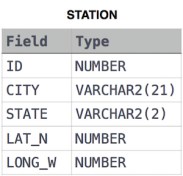
1 – Query the list of CITY names starting with vowels (i.e., aeio, or u) from STATION. Your result cannot contain duplicates.

1449345840-5f0a551030-Station.jpg

Answer : select city from station where city like ‘[aeiou]%’


2 – Query the names of all American cities in CITY with populations larger than 120000. The CountryCode for America is USA.

1449729804-f21d187d0f-CITY.jpg

Answer : select name from city where countrycode =’USA’ and population > 120000


3 – Query a list of CITY names from STATION with even ID numbers only. You may print the results in any order, but must exclude duplicates .  1449345840-5f0a551030-Station.jpg

Answer : select distinct city from station where id % 2=0 order by city


4 – Query the two cities in STATION with the shortest and longest CITY names, as well as their respective lengths (i.e.: number of characters in the name). If there is more than one smallest or largest city, choose the one that comes first when ordered alphabetically.

Input Format

The STATION table is described as follows:


1449345840-5f0a551030-Station.jpg

Sample Output

ABC 3
PQRS 4

Answer :   select top 1 city,LEN(city) from STATION order by len(city),city;
select top 1 city,LEN(city) from STATION order by len(city) desc


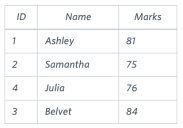
5 – Query the Name of any student in STUDENTS who scored higher than  Marks. Order your output by the last three characters of each name. If two or more students both have names ending in the same last three characters (i.e.: Bobby, Robby, etc.), secondary sort them by ascending ID.


1443815209-cf4b260993-2.png


select name
from students
where marks>75 and name=’Stuart’
order by substring(name,len(name)-2, 3) , id asc;


Explanation  of Substring : SELECT substring(‘W3Schools.com’,LEN(‘W3Schools.com’)-2,3);    –> com  (13-2) =11 ,3 –> 11 to 3

substring(‘W3Schools.com’,LEN(‘W3Schools.com’)-1,3);    –> om  (12-2) =10  ,3  –> 10 to 3

substring(‘W3Schools.com’,LEN(‘W3Schools.com’)-3,3);    –> om  (12-3) =9  ,3  –>  9 to 12


Group By Clause

With Group by we can arrange rows in groups and apply aggregate functions against those groups.

USE TSQL2012;
SELECT COUNT(*) AS numorders
FROM Sales.Orders;

This query generates the following output.

numorders
———–
830

Because there is no GROUP BY clause, all rows queried from the Sales.Orders table are arranged in one group, and then the COUNT(*) function counts the number of rows in that group. Grouped queries return one result row per group, and because the query defines only one group, it returns only one row in the result set.

Now Using GROUP BY clause, you can group the rows based on a specified grouping set of expressions.

For example, the following query groups the rows by shipper ID and
counts the number of rows (orders, in this case) per each distinct group.
SELECT shipperid, COUNT(*) AS numorders
FROM Sales.Orders
GROUP BY shipperid;

This query generates the following output.
shipperid     numorders
———–          ———–
1                    249
2                   326
3                   255

The query identifies three groups because there are three distinct shipper IDs.

The grouping set can be made of multiple elements. For example, the following query groups the rows by shipper ID and shipped year.
SELECT shipperid, YEAR(shippeddate) AS shippedyear,
COUNT(*) AS numorders
FROM Sales.Orders
GROUP BY shipperid, YEAR(shippeddate);

shipperid         shippedyear            numorders
———–                ———–                     ———–
1                           2008                         79
3                           2008                         73
1                         NULL                         4
3                         NULL                         6
1                          2006                         36
2                          2007                        143
2                         NULL                        11
3                          2006                         51
1                          2007                        130
2                          2008                        116
2                          2006                        56
3                          2007                        125

Notice that you get a group for each distinct shipper ID and shipped year combination that exists in the data, even when the shipped year is NULL. Remember that a NULL in the shippeddate column represents unshipped orders, so a NULL in the shippedyear column represents the group of unshipped orders for the respective shipper.
If you need to filter entire groups, you need a filtering option that is evaluated at the group level not like the WHERE clause, which is evaluated at the row level. For this, SQL provides the HAVING clause. Like the WHERE clause, the HAVING clause uses a predicate but evaluates the predicate per group as opposed to per row. This means that you can refer to aggregate computations because the data has already been grouped.

For example, suppose that you need to group only shipped orders by shipper ID and shipping year, and filter only groups having fewer than 100 orders. You can use the following query to achieve this task.
SELECT shipperid, YEAR(shippeddate) AS shippedyear,
COUNT(*) AS numorders
FROM Sales.Orders
WHERE shippeddate IS NOT NULL
GROUP BY shipperid, YEAR(shippeddate)
HAVING COUNT(*) < 100;
This query generates the following output

shipperid         shippedyear        numorders
———–              ———–                    ———–
1                       2008                          79
3                       2008                          73
1                       2006                          36
3                       2006                          51
2                       2006                          56

Notice that the query filters only shipped orders in the WHERE clause. This filter is applied at the row level conceptually before the data is grouped. Next the query groups the data by shipper ID and shipped year. Then the HAVING clause filters only groups that have a count of rows (orders) that is less than 100. Finally, the SELECT clause returns the shipper ID, shipped year, and count of orders per each remaining group.

The following query invokes the COUNT(*) function, in addition to a number of general set functions, including COUNT.

SELECT shipperid,
COUNT(*) AS numorders,
COUNT(shippeddate) AS shippedorders,
MIN(shippeddate) AS firstshipdate,
MAX(shippeddate) AS lastshipdate,
SUM(val) AS totalvalue
FROM Sales.OrderValues
GROUP BY shipperid;

This query generates the following output (dates formatted for readability).
shipperid   numorders   shippedorders  firstshipdate lastshipdate       totalvalue
———–          ———-             ————             ————-          ————-           ———–
3                       255                    249                    2006-07-15     2008-05-01       383405.53
1                       249                    245                    2006-07-10    2008-05-04       348840.00
2                       326                    315                    2006-07-11     2008-05-06       533547.69

The difference in count(*) and count(shippeddate) is count(*) does not ignore NULL where count(shippeddate) does.

With general set functions, you can work with distinct occurrences by specifying a DISTINCT clause before the expression, as follows.
SELECT shipperid, COUNT(DISTINCT shippeddate) AS numshippingdates
FROM Sales.Orders
GROUP BY shipperid;

This query generates the following output.
shipperid        numshippingdates
———–               —————–
1                          188
2                          215
3                          198

SELECT shipperid, COUNT(shippeddate) AS numshippingdates
FROM Sales.Orders
GROUP BY shipperid;

This query generates the following output.
shipperid        numshippingdates
———–               —————–
1                          249
2                          245
3                          315

Note that the DISTINCT option is available not only to the COUNT function, but also to other general set functions. However, it’s more common to use it with COUNT.

SELECT S.shipperid, S.companyname,
COUNT(*) AS numorders
FROM Sales.Shippers AS S
INNER JOIN Sales.Orders AS O
ON S.shipperid = O.shipperid
GROUP BY S.shipperid, S.companyname;
This query generates the following output.
shipperid            companyname               numorders
———–                       ————–                        ———–
1                               Shipper GVSUA               249
2                               Shipper ETYNR               326
3                               Shipper ZHISN                 255


Thanks

USER DEFINED FUNCTIONS(UDF)

The user defined functions returns result after using an input parameters with a logic that calculates something .

There are two types of UDF are : scalar and table valued functions.

Scalar UDF returns a single value while the table valued functions returns a table.


Triggers

Trigger is a code just like a stored procedure that runs whenever an event takes place. The event is related to DML (Data manipulation Language ) events and DDL(Data definition Language ) events .

1 – DDL(Data definition Language ) Triggers :

DDL statements means statements like :Create , alter etc . These triggers can be used for Auditing purposes or change management . They can be used for tracking whenever a CREATE table  or ALTER table statement is being run and can help the database administrators to use the logged information through these triggers about the events of Creation , alter or other DDL events.

2 –  DML(Data Manipulation Language ) Triggers :

SQL supports two types of DML triggers : After and instead of.

2.1 – AFTER Trigger :  

After Trigger fires after the event it is associated with it completes.

This trigger works only on permanent tables.

In the trigger’s code you can access the table that are called inserted and deleted that contains which were affected by the modification that caused the trigger to fire. The inserted table contains the image of the new data inserted . Whereas the deleted table holds the old image of the affected rows.

Example : 

IF OBJECT_ID('dbo.Table1_Audit', 'U') IS NOT NULL DROP TABLE dbo.Table1_Audit;
IF OBJECT_ID('dbo.Table1, 'U') IS NOT NULL DROP TABLE dbo.Table1;
CREATE TABLE dbo.Table1
(
keycol INT NOT NULL PRIMARY KEY,
datacol VARCHAR(10) NOT NULL
);
CREATE TABLE dbo.Table1_Audit
(
audit_lsn INT NOT NULL IDENTITY PRIMARY KEY,
dt DATETIME NOT NULL DEFAULT(SYSDATETIME()),
login_name sysname NOT NULL DEFAULT(ORIGINAL_LOGIN()),
keycol INT NOT NULL,
datacol VARCHAR(10) NOT NULL
);

--Now creating trigger

CREATE TRIGGER trg_Table1_insert_audit ON dbo.Table1 AFTER INSERT
AS
SET NOCOUNT ON;
INSERT INTO dbo.Table1_Audit(keycol, datacol)
SELECT keycol, datacol FROM inserted;
GO

--Now insert values into the table1

INSERT INTO dbo.Table1(keycol, datacol) VALUES(1, 'a');

Once the insert statement is run the trigger trg_Table1_insert_audit runs . We can now verify the audit table1 :

SELECT audit_lsn, dt, login_name, keycol, datacol FROM dbo.Table1_Audit;

Now check the table1 :

select * from Table1

2.2 – INSTEAD OF Trigger :  

In the Instead of triggers, the inserted and deleted tables contain the rows that were supposed or about to be affected (Inserted or Deleted) by the modification that caused the trigger to fire.

Example : 

IF OBJECT_ID('dbo.Table1_Audit', 'U') IS NOT NULL DROP TABLE dbo.Table1_Audit;
IF OBJECT_ID('dbo.Table1, 'U') IS NOT NULL DROP TABLE dbo.Table1;
CREATE TABLE dbo.Table1
(
keycol INT NOT NULL PRIMARY KEY,
datacol VARCHAR(10) NOT NULL
);
CREATE TABLE dbo.Table1_Audit
(
audit_lsn INT NOT NULL IDENTITY PRIMARY KEY,
dt DATETIME NOT NULL DEFAULT(SYSDATETIME()),
login_name sysname NOT NULL DEFAULT(ORIGINAL_LOGIN()),
keycol INT NOT NULL,
datacol VARCHAR(10) NOT NULL
);
--Now creating trigger INSTEAD OF

CREATE TRIGGER trg_Table1_insert_audit ON dbo.Table1 instead of insert
AS
SET NOCOUNT ON;
INSERT INTO dbo.Table1_Audit(keycol, datacol)
SELECT keycol, datacol FROM inserted;
GO

–Now insert values into the table1

INSERT INTO dbo.Table1(keycol, datacol) VALUES(1, 'a');

Once the insert statement is run the trigger trg_Table1_insert_audit runs . We can now verify the audit table1 :

SELECT audit_lsn, dt, login_name, keycol, datacol FROM dbo.Table1_Audit;

To make clear the difference , check the Table1 for understanding !

select * from Table1

Table Variable

We declare table variables as we declare other variables in SQL .

Table variables are just like the local temp tables and they reside in tempdb which is the temporary database.

Table variable are only available to the creating session .

One drawback with table variable is that they are only available and visible to the current batch and they are neither visible to other batches not even to the inner batches.

So , use the table variables when there is less amount of rows to work with .


Cursors

The cursors are in contrast with the relational model which is based on the set Theory .

The cursors are slow as compared to the relational based set implementation  as they manipulate and work on the data row by row iteratively which is typically slow.

One of the main reasons of cursors are slow is because of overhead being caused due to : declaration of the cursor , then opening the cursor , looping through the cursor , closing the cursor and then de allocating the cursor .

Use cursors when you have a situation where a not a better solution exists from logical set based implementations  .

A good example where you can cursors is to run it to know the total number  of rows in a table.